Deploy Database Streaming with DBConvert Anywhere: The Complete Guide to Migration and Replication process.
Set up real-time database replication in minutes with DBConvert Streams. Combine CDC, bulk migration, and blazing-fast performance—no vendor lock-in.
Setting up enterprise-grade database streaming and replication has never been easier. With DBConvert Streams, you can launch real-time data replication in under five minutes using a single command. This Docker-native, no-code platform supports Change Data Capture (CDC), bulk migrations, and database exploration— delivering up to 120 MB/s throughput under optimal conditions.
Designed for flexibility and performance, DBConvert Streams enables continuous synchronization between source and target systems, ensuring reliable, uninterrupted access to accurate data across environments. Whether you're migrating between databases, integrating cloud infrastructure, or consolidating systems, the platform helps you avoid vendor lock-in and maintain operational continuity with minimal disruption.
📘 Introduction to Database Migration
Database migration is the process of transferring data from one or more source databases to one or more target databases, with a strong focus on ensuring data consistency and data integrity throughout every stage. As organizations evolve—whether upgrading database systems, consolidating data warehouses, or moving to cloud-based infrastructure—database migration becomes essential for supporting new business requirements and maintaining competitive advantage. After a database migration is finished, the dataset in source databases resides fully in the target databases.
A successful migration involves several key steps:
- data extraction from the source databases,
- data transformation to match the schema and requirements of the target databases,
- data loading into the new environment.
Each step must be carefully managed to prevent data loss and maintain high data availability.
Real time data replication plays a crucial role in this process, enabling continuous data synchronization between source and target systems. Active-passive migration allows source databases to be modified during the migration while target databases only allow read-only access. By leveraging advanced data replication tools, organizations can minimize data latency, ensure seamless data access, and maintain data integrity, even as data flows between different database systems.
A primary goal of database migration is to turn down the source database systems after the migration completes. This approach not only supports business continuity but also allows for faster, more reliable migrations with minimal disruption.
🧰 What is DBConvert Streams Data Integration Tool?
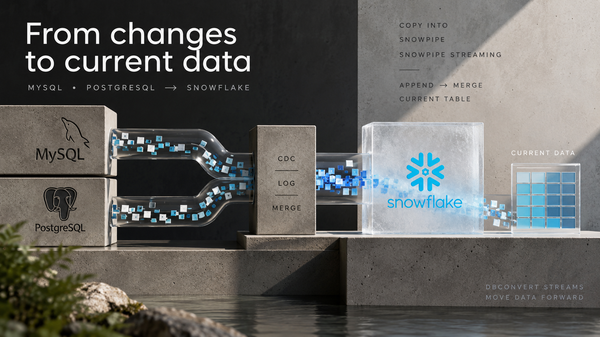
DBConvert Streams is a distributed database streaming platform designed to support both real-time data replication and one-time data migrations, particularly between MySQL and PostgreSQL databases. As a modern database sync tool and data replication tool, it emphasizes compatibility, ease of use, scalability, and integration, making it suitable for organizations seeking efficient and flexible real-time data replication.
It leverages a containerized architecture comprising API, reader, writer, and NATS services. This design enables cloud database migration anywhere Docker runs—from local machines to cloud providers such as Google Cloud—without vendor lock-in.
For organizations requiring support for other database systems, DBConvert offers desktop applications compatible with over 30 database types, including Firebird, Oracle databases, SQL Server, SQLite, Access, and FoxPro.
This extensive support ensures that DBConvert can handle a variety of data sources and target databases, including integration with social media platforms, facilitating both homogeneous and heterogeneous migration scenarios. Learn more about DBConvert's full capabilities and offerings at dbconvert.com.
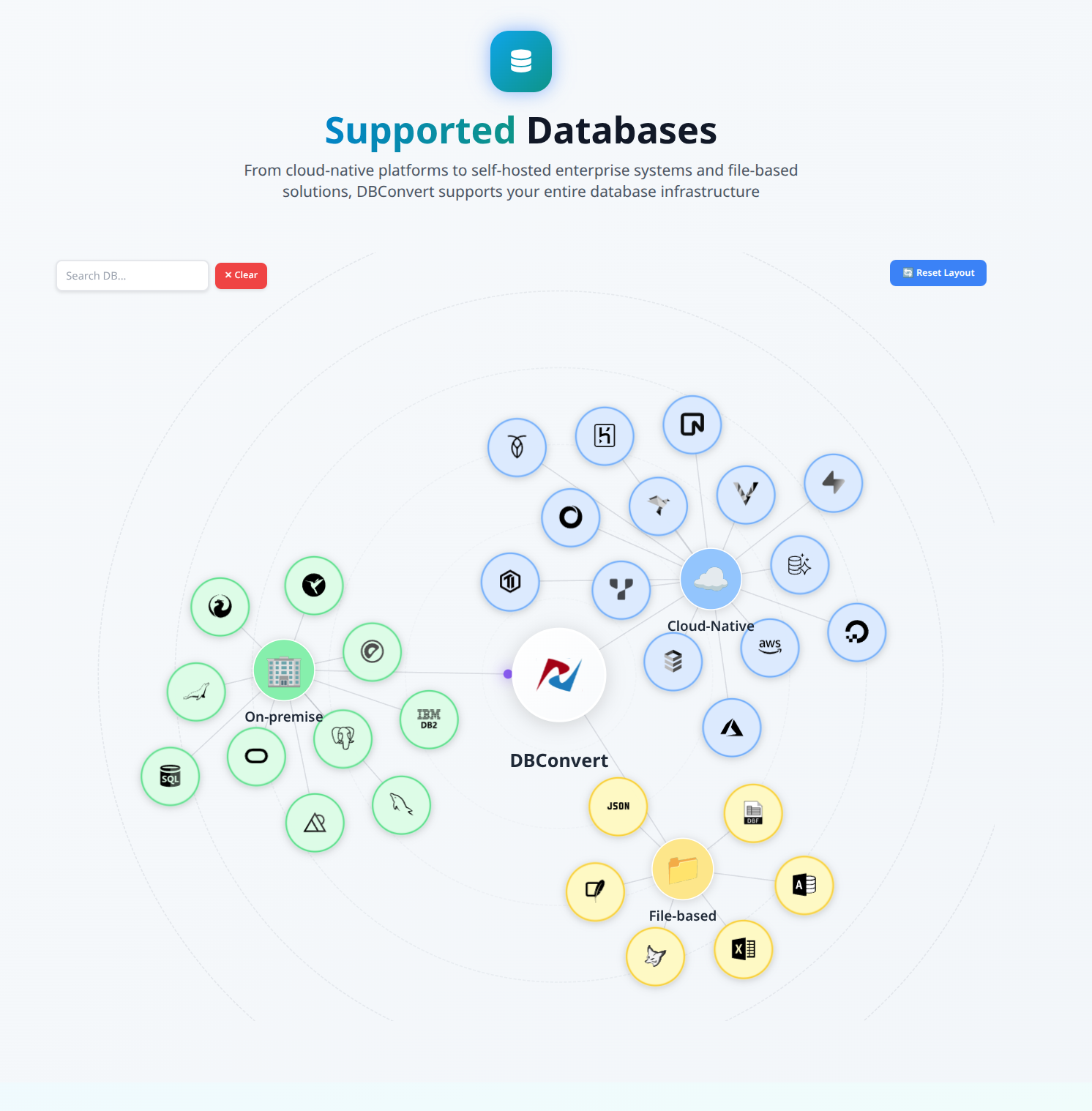
✨ Key Capabilities at a Glance
DBConvert Streams boasts a comprehensive set of features tailored to streamline database streaming and real-time data synchronization:
- Bidirectional support: Enables seamless MySQL ↔ PostgreSQL database streaming, facilitating data synchronization between source and target systems.
- Automatic schema conversion: Manages data type mapping and DDL translation in both directions, ensuring data integrity and consistency during replication and migration.
- Data transformation: Supports SQL-based data transformation during migration through a no-code visual interface, allowing users to process data faster and tailor data workflows.
- Dual operation modes: Offers real-time data replication using CDC for continuous data replication and bulk migration for one-time data transfer.
- Cloud-native compatibility: Supports cloud database migration with services such as Amazon RDS, Aurora, Google Cloud SQL, and Azure Database, enhancing data availability and disaster recovery capabilities.
- High performance: Capable of processing 50 million records (approximately 150 GB) in around 20 minutes, minimizing data latency and ensuring timely data access.
- One-command deployment: Uses a universal installer that works across platforms for instant data pipeline deployment, simplifying data integration and management.
- Sync data across sources and destinations: Facilitates syncing data between multiple databases and platforms, supporting efficient ETL processes and integration workflows.
🧭 Classification of Database Migrations

Understanding the classification of database migrations is vital for selecting the right migration strategy and tools. Migrations are typically categorized as either homogeneous or heterogeneous:
- Homogeneous migration occurs when both the source and target databases are of the same type, such as migrating from one PostgreSQL database to another. This type of migration is generally more straightforward, as the data structures and database objects are compatible, simplifying the data integration process.
Homogeneous migrations often involve a relational database, where tables and rows can be directly mapped to maintain data consistency and equivalence between source and target systems. - Heterogeneous migration involves transferring data between different types of database systems, such as moving from a Postgres database to a MySQL database. These migrations are more complex, requiring robust data replication and data integration tools to handle differences in data types, schema, and database logic. Heterogeneous migration is a migration from source databases to target databases where the source and target databases are of different database management systems. Maintaining data consistency across various devices and applications is difficult, adding another layer of complexity to heterogeneous migrations.
Additionally, migrations can be classified based on the level of downtime required. Some migrations can be performed with zero downtime, while others may necessitate planned outages. Choosing the right approach depends on business requirements, the criticality of the data, and the capabilities of the data replication tools in use. By understanding these classifications, organizations can better plan their migration projects, ensuring a smooth transition between source and target databases, whether for homogeneous or heterogeneous migration scenarios.
🧙♂️ The Universal Installer: Deploy Your Data Pipeline Anywhere
DBConvert Streams simplifies deployment with a universal installer script that detects your environment and configures everything automatically. Whether you are setting up database streaming on AWS, running locally, or using cost-effective providers like Hetzner, the installation process remains consistent and straightforward:
curl -fsSL https://dbconvert.nyc3.digitaloceanspaces.com/downloads/streams/latest/docker-install.sh | sh
This intelligent installer performs several critical tasks:
- Automatically detects your environment, including AWS, Google Cloud Platform, Azure, DigitalOcean, Hetzner, Vultr, or local setups.
- Installs Docker and Docker Compose if they are not already present, ensuring the necessary infrastructure for containerized deployment.
- Deploys all required containers with appropriate configurations for smooth operation.
- Sets up security, monitoring, and logging automatically to maintain data integrity and system performance.
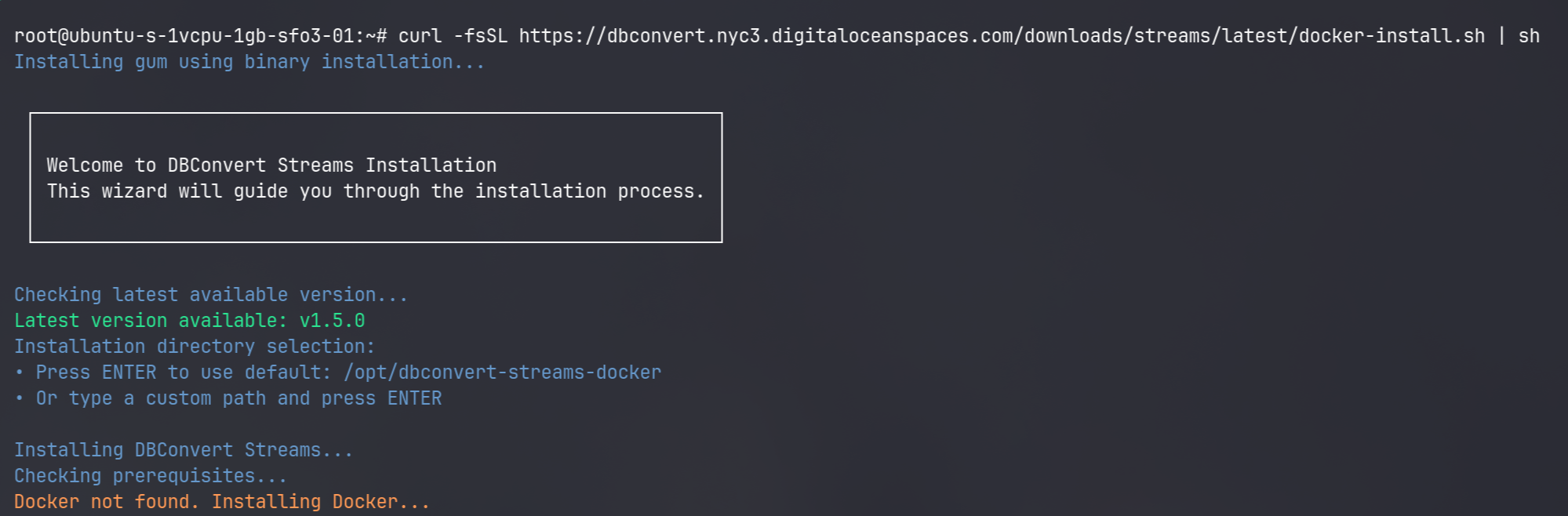
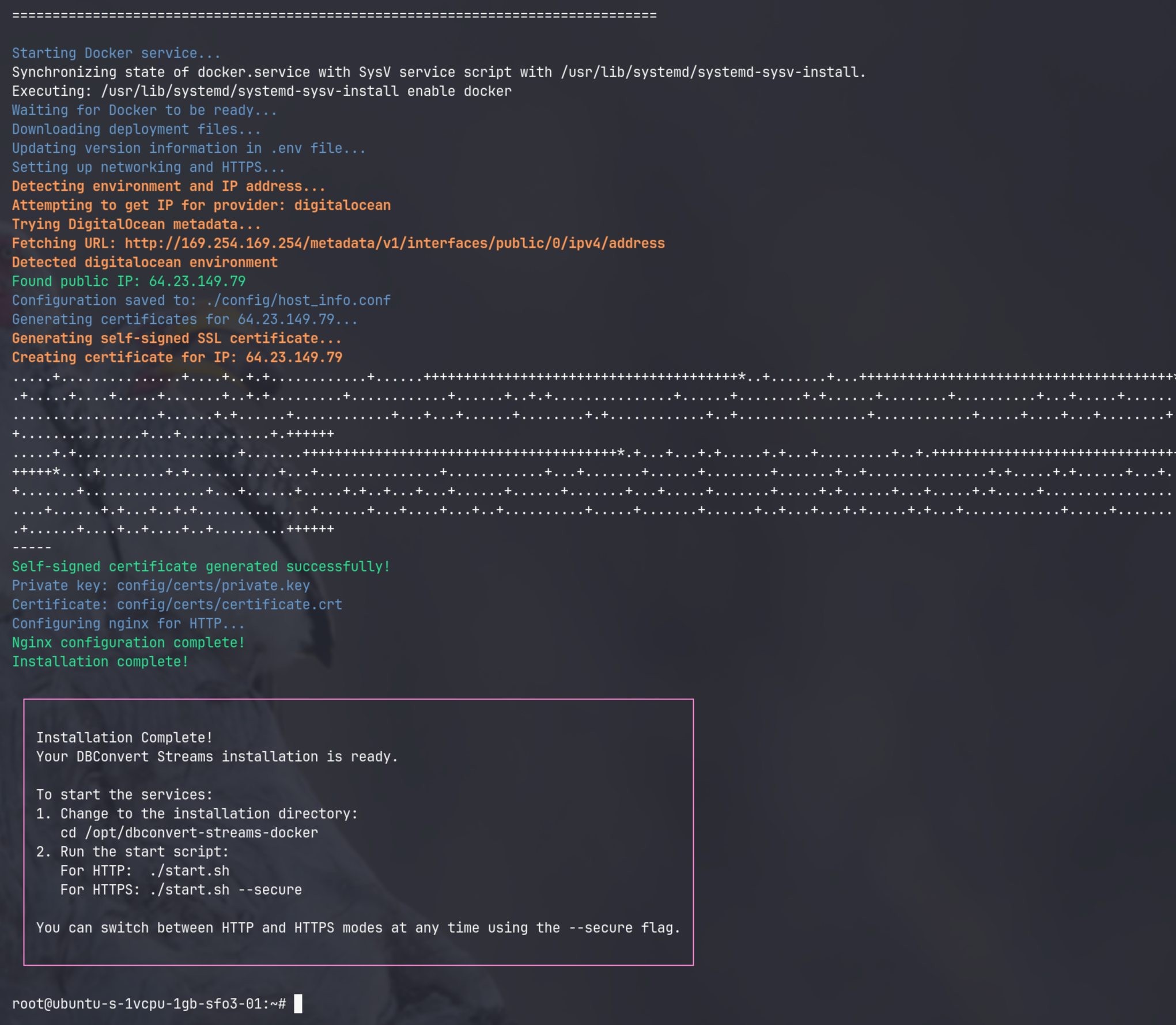
With no need for manual configuration files or platform-specific tweaks, you can deploy database streaming and real-time data synchronization with just one command, regardless of your infrastructure.
☁️ Deployment Options: Choose Your Platform
DBConvert Streams offers flexible deployment options across major cloud providers and local environments, enabling you to tailor your data replication strategy to your organizational needs and budget. Real-time replication ensures data consistency and high availability across multiple locations, supporting synchronized access for distributed teams or data centers.
💻 Major Cloud Providers for Cloud Database Migration
| Provider | Instance Types | Best For | Key Advantage |
|---|---|---|---|
| AWS EC2 | t3.medium and up | Enterprise integration | Comprehensive services |
| GCP | e2-medium and up | Global deployment | Network performance |
| Azure | Standard_B2s and up | Microsoft ecosystem | Enterprise features |
| Hetzner | CX21 and up | EU compliance | Cost-effective pricing |
| DigitalOcean | 2GB Droplet and up | Developer friendly | Simple pricing |
| Vultr | 2GB instance and up | Global presence | High-frequency compute |
Note: Actual costs vary based on instance type, region, storage, and bandwidth usage. DBConvert Streams can run on minimal instances for testing or larger instances for production workloads. Be sure to consult each provider’s pricing calculator for accurate cost estimates.
Amazon Web Services (AWS)
AWS is ideal for organizations already invested in the AWS ecosystem. DBConvert Streams integrates seamlessly with Amazon RDS and Aurora databases, supporting real-time data replication and disaster recovery strategies.
Quick deployment steps:
- Launch an EC2 instance (t3.medium or larger).
- Run the universal installer.
- Configure security groups to allow database access.
Cost optimization tip: Utilize Reserved Instances to save 40-60% on long-running deployments, ensuring high data availability at reduced costs.
Google Cloud Platform (GCP)
GCP offers excellent network performance and integration with Cloud SQL, making it a strong choice for global deployments requiring low data latency.
Deployment steps:
- Create a Compute Engine instance.
- Execute the installer script.
- Set up firewall rules to permit database connections.
Microsoft Azure
Azure provides seamless integration with Azure Database services and enterprise-grade authentication mechanisms. DBConvert Streams is available directly from the Azure Marketplace.
Getting started:
- Provision a Virtual Machine.
- Run the one-line installer.
- Configure Network Security Groups to secure data flows.
💸 Budget-Friendly Alternatives
Hetzner Cloud (60-70% Cost Savings)
Hetzner offers European data centers with exceptional price-performance ratios. This option is perfect for organizations with GDPR compliance requirements seeking cost-efficient data replication solutions.
# Create instance via Hetzner CLI
hcloud server create --name dbconvert-streams --type cx21 --image ubuntu-22.04

# SSH and install
ssh root@<server-ip>
curl -fsSL https://dbconvert.nyc3.digitaloceanspaces.com/downloads/streams/latest/docker-install.sh | sh
For detailed instructions, refer to the Hetzner deployment guide.
DigitalOcean (30-40% Savings)
DigitalOcean provides a developer-friendly environment with a one-click marketplace app for rapid deployment.
One-click deployment steps:
- Visit the DigitalOcean Marketplace.
- Search for "DBConvert Streams".
- Click "Create Droplet".
- Access your instance where DBConvert Streams is pre-installed.
Vultr (40-50% Savings)
Vultr offers global presence with high-frequency compute instances and NVMe storage, optimizing database performance. DBConvert Streams is available as a one-click app in the Vultr Marketplace.
🖥️ Local Development and Testing
For developers and data engineers who prefer local environments, DBConvert Streams supports Windows, macOS, and Linux workstations.
Windows with Docker Desktop
Prerequisites: Install Docker Desktop for Windows from docker.com. For instructions on how to build docker images for Windows desktop applications, refer to this Windows deployment guide for detailed instructions.
macOS
# With Docker Desktop installed
curl -fsSL https://dbconvert.nyc3.digitaloceanspaces.com/downloads/streams/latest/docker-install.sh | sh
Linux Workstations
Supports all major distributions, including Ubuntu, Debian, CentOS, RHEL, and Fedora, facilitating easy deployment for data engineering teams.
🧱 Architecture Deep Dive for Real Time Data Replication
DBConvert Streams deploys a comprehensive database streaming ecosystem designed to support real-time data replication with high data consistency and availability. The architecture diagram below illustrates the replication process, which enables continuous data synchronization between the primary database (source DB) and the destination database (target DB), ensuring high availability and data integrity.
┌─────────────────┐     ┌─────────────────┐     ┌─────────────────┐
│   Source DB     │───▶│     Reader      │───▶│      NATS       │
│ MySQL/PostgreSQL│     │  (CDC Monitor)  │     │  (Event Bus)    │
└─────────────────┘     └─────────────────┘     └────────┬────────┘
                                                         │
┌─────────────────┐     ┌─────────────────┐              │
│   Target DB     │◀───│     Writer      │◀────────────┘
│ MySQL/PostgreSQL│     │ (Data Delivery) │
└─────────────────┘     └─────────────────┘

                        ┌─────────────────┐
                        │    API/UI       │
                        │  (Management)   │
                        │                 │
                        │ • Configures    │
                        │ • Monitors      │
                        │ • Controls      │
                        └─────────────────┘
In this setup, the primary database acts as the main source of data, while the destination database receives replicated changes, both working together to maintain data consistency throughout the replication process. The Reader Service monitors transaction logs from such databases, which track data modifications and support reliable change replication. When migrating or synchronizing data, it is crucial to ensure consistency between relational databases, especially those with structured tables and rows, to guarantee accurate data equivalence between the source and target systems.
🧩 Core Services Explained
- API Service: Provides a RESTful API and web UI for configuration, monitoring, and management of data replication streams, simplifying data integration without coding. The API Service also allows users to query data to verify consistency and correctness during and after migration.
- Reader Service: Monitors source database changes using transaction logs—binary logs for MySQL or logical replication for PostgreSQL—enabling efficient change data capture.
- Writer Service: Delivers data to the target database, performing automatic data type conversion and ensuring data integrity and accuracy during transfer. The Writer Service supports querying data to confirm that in-transit and migrated data remains consistent, especially during recovery or large-scale processing.
- NATS: A high-performance message bus that handles millions of events per second, facilitating smooth streaming data flows between components.
- Supporting Services: Includes Consul for configuration management, Vault for secrets management, and tools for monitoring and logging to maintain system performance and data quality. A good data replication tool prioritizes robust security features such as data encryption and secure data transfer protocols.
This architecture supports continuous data replication and real-time data synchronization, minimizing data latency and preventing data loss while ensuring high data availability.
🔄 Data Transformation and Processing
Data transformation and processing are essential steps in any database migration, ensuring that data from the source database is accurately and efficiently converted to fit the structure and requirements of the target database. This process includes data mapping, where fields from the source are matched to their counterparts in the target, as well as data aggregation and filtering to refine and optimize the data being transferred.
DBConvert Streams offers a Migration Mode that functions as an ETL (Extract, Transform, Load) process with custom transformations. Users can leverage their own SQL SELECT queries during migration to perform
- case conversions,
- string cleaning,
- data type modifications,
- and apply filtering conditions.
This capability ensures that transformed data lands in the target database fully prepared and ready for immediate use, streamlining downstream processes and enhancing data quality.
Example of Data Transformation Query
Here is an example SQL query demonstrating data transformation during migration:
SELECT
  id,
  UPPER(full_name) AS full_name,
  LOWER(email) AS email,
  DATE(registered_at) AS registered_at
FROM users
WHERE email IS NOT NULL;
This query converts the full_name field to uppercase, the email field to lowercase, extracts the date part from the registered_at timestamp, and filters out records where the email is null, showcasing how DBConvert Streams can perform data transformation seamlessly during replication.
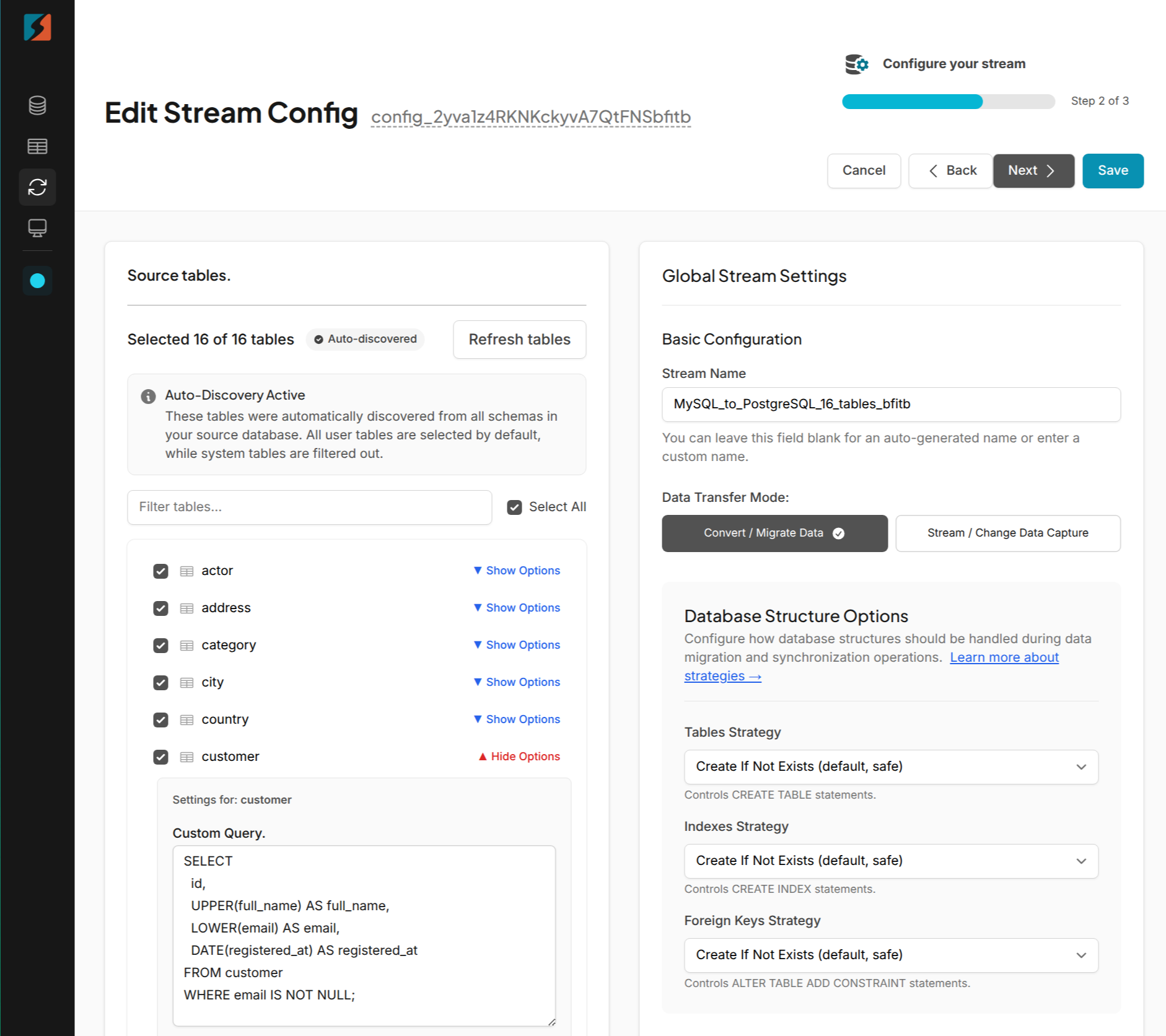
Integrated Database Explorer.
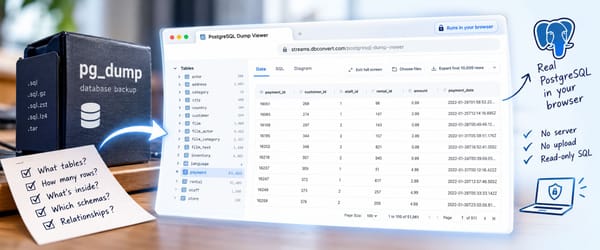
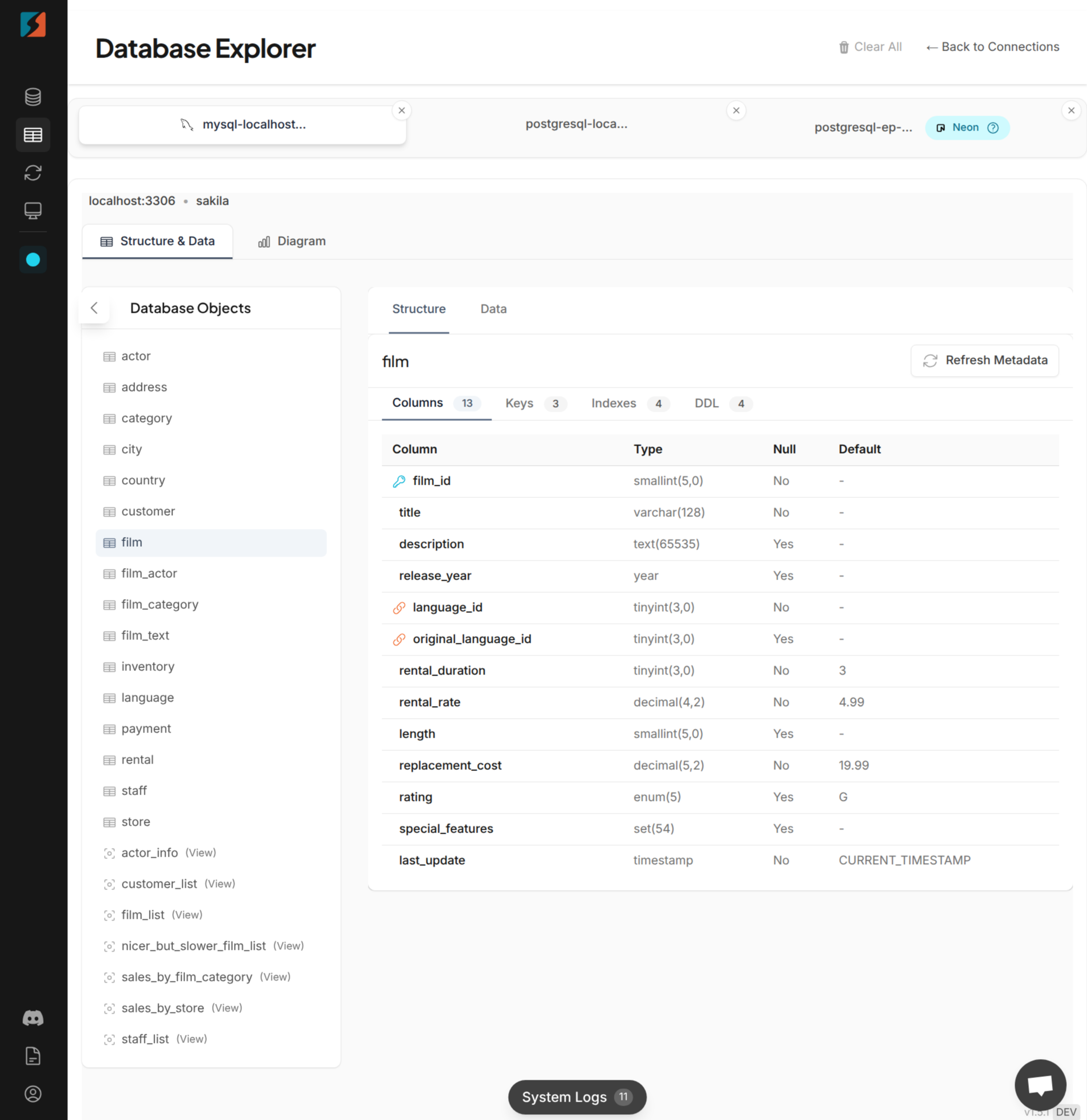
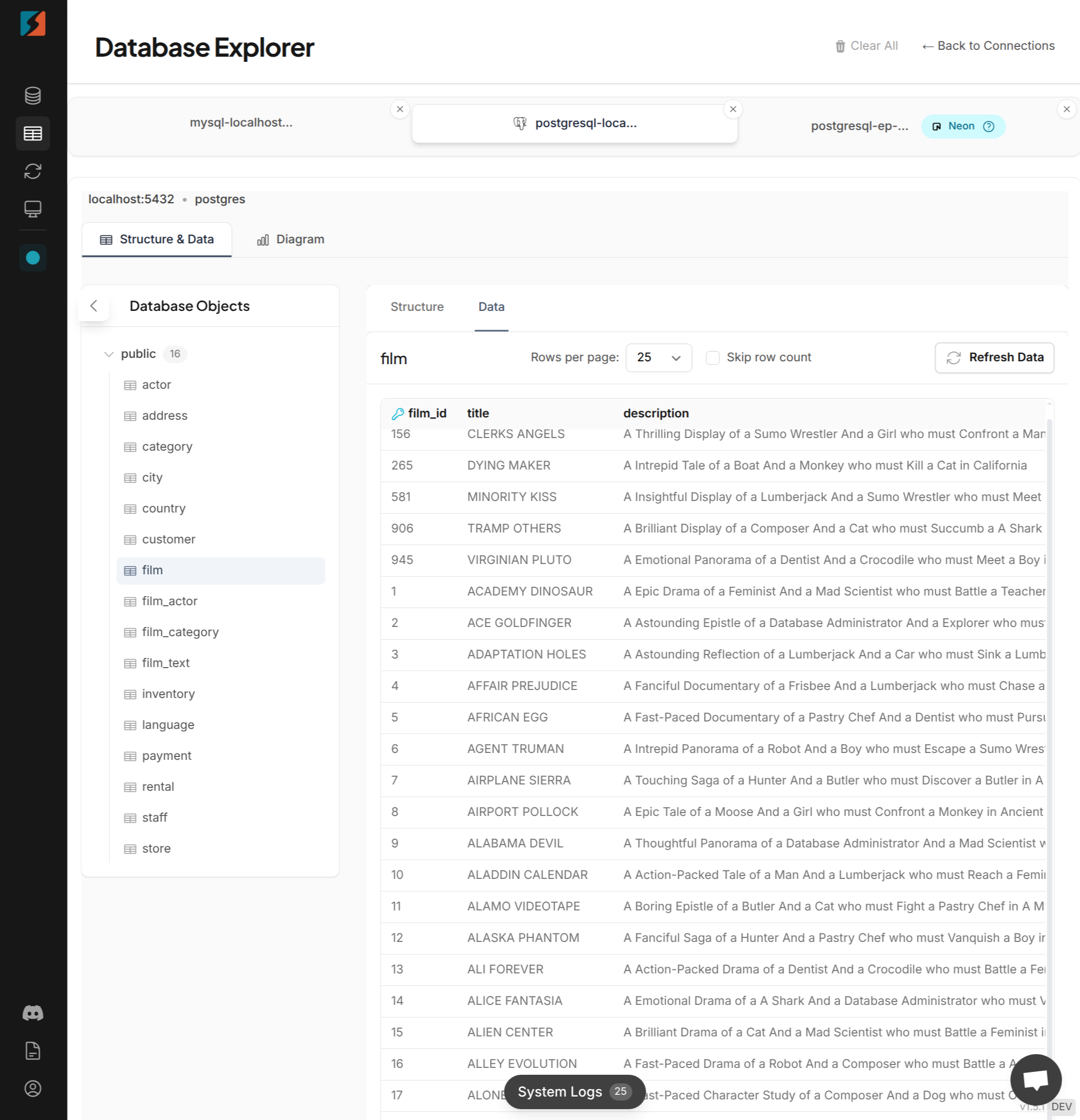
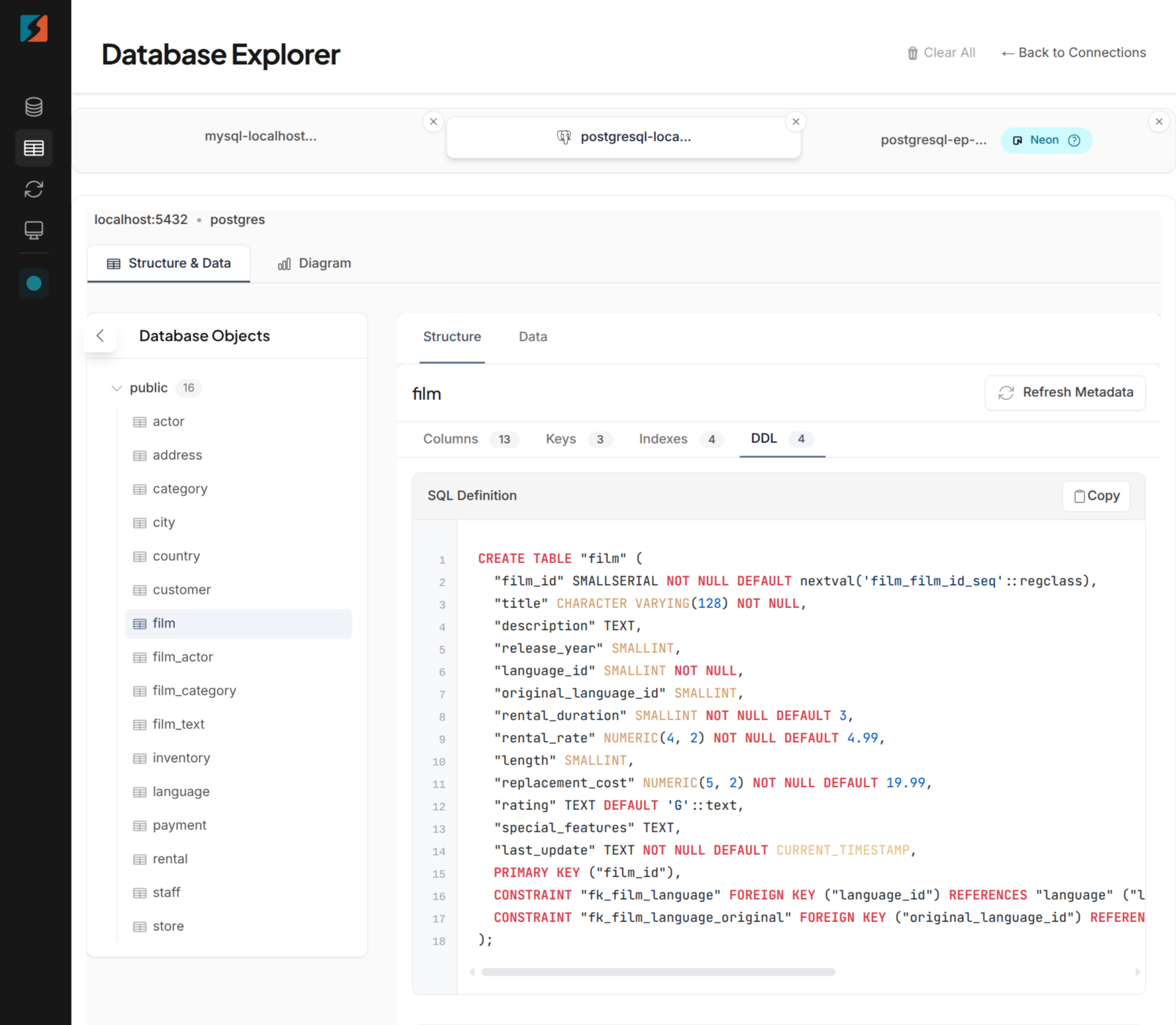
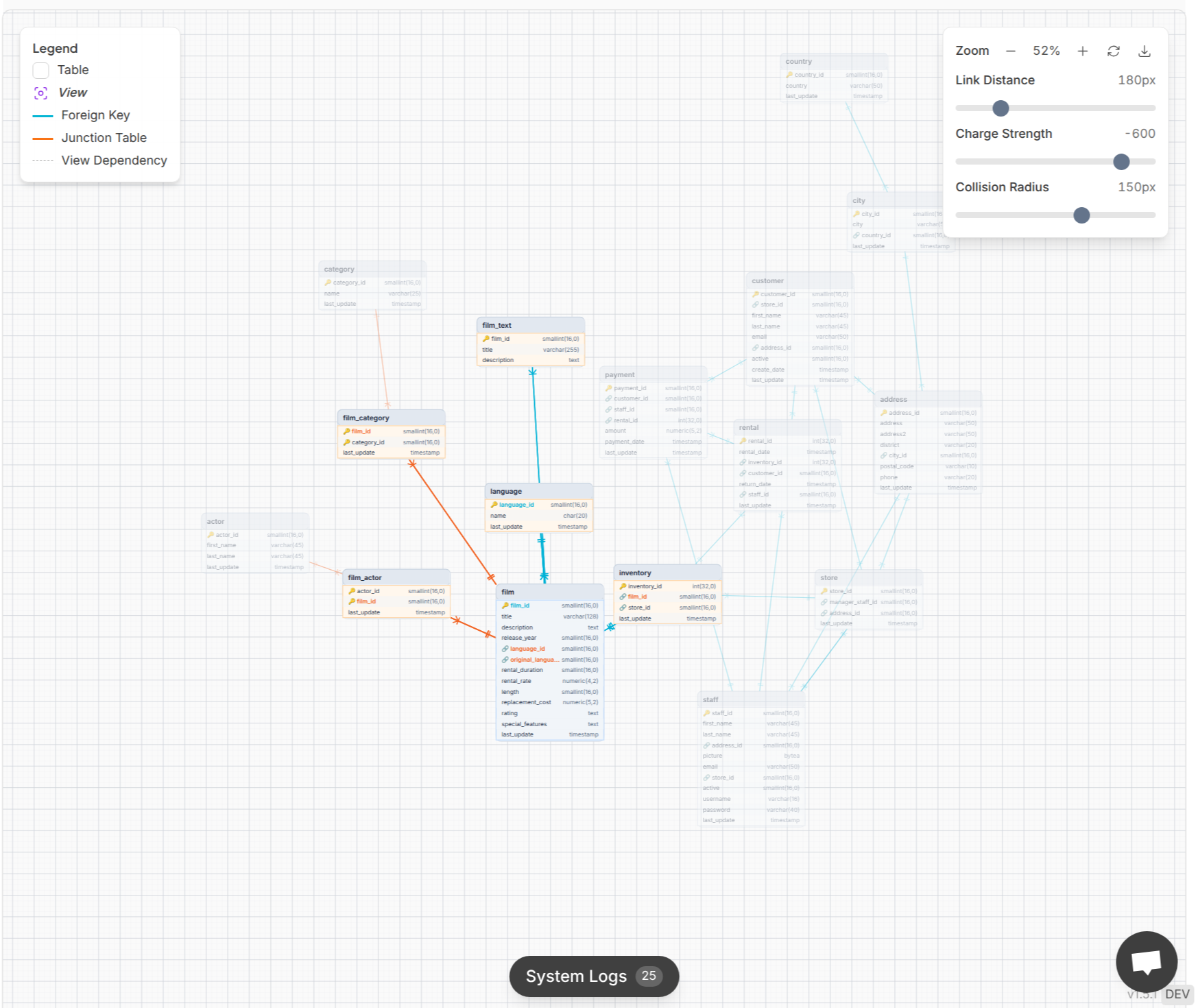
DBConvert Streams includes a powerful Database Explorer feature that enhances your data migration and replication experience by providing comprehensive insights into your database structures and contents. This integrated toolset allows you to better understand and manage your source and target databases during streaming operations.
Structure Viewer
The Structure Viewer lets you explore detailed table structures, including columns, keys, and indexes. This feature helps you quickly assess schema components, ensuring accurate mapping and transformation during migration or replication.
Data Browser
With the Data Browser, you can browse and navigate through your data effortlessly. It supports advanced filtering options, enabling you to pinpoint specific records or datasets within large tables, making data validation and troubleshooting more efficient.
DDL Viewer
The DDL Viewer provides a clear view and analysis of table definitions and SQL structures. This capability aids in understanding the schema design and verifying that data definitions align between source and target databases.
Database Diagram
Visualize complex database relationships and connections with the Database Diagram tool. This visualization helps in grasping the overall database architecture, facilitating better planning and execution of migration workflows.
📈 Performance Benchmarks, Data Integrity, and Optimization
DBConvert Streams is engineered for high throughput and low latency to support demanding data engineering workflows:
- Throughput: Achieves up to 120 MB/s under optimal network conditions, enabling rapid data transfer and replication.
- Latency: Provides sub-second replication latency in CDC mode, ensuring near real-time data availability.
- Scale: Successfully migrates 50 million records (approximately 150 GB) in around 20 minutes, supporting large-scale PostgreSQL and MySQL database systems.
- Resource Efficiency: Utilizes lightweight Docker images ranging from 15 to 30 MB, minimizing resource usage and enabling deployment on minimal instances without compromising system performance.
Scalability issues can affect operational efficiency and increase resource requirements during data synchronization, making it essential to optimize workflows and infrastructure for large-scale operations.
These performance characteristics make DBConvert Streams ideal for scenarios requiring maintaining data consistency and data integrity across multiple systems and locations. Real-time data replication also helps maintain data accessibility and consistency even during system failure, supporting business continuity.
🛠️ Step-by-Step Deployment Guide
Here’s a quick-start guide to deploying your database streaming solution in minutes. Whether you’re configuring Change Data Capture (CDC) or running a bulk migration, it all starts with understanding your source data — essential for reliable, uninterrupted synchronization. For a full visual walkthrough, check out our step-by-step deployment video.
1. Prepare Your Environment
This configuration is only required for CDC (Change Data Capture) mode. If you plan to use "bulk migration" mode only, you can skip this configuration for databases.
Before deploying DBConvert Streams, configure your source databases to support Change Data Capture if you plan to use real-time replication. Enabling the following features allows your databases to support data replication and ensure high availability.
MySQL (as CDC source):
-- Enable binary logging for data capture
SET GLOBAL binlog_format = 'ROW';
SET GLOBAL binlog_row_image = 'FULL';

-- Create replication user with necessary privileges
CREATE USER 'dbconvert'@'%' IDENTIFIED BY 'secure_password';
GRANT REPLICATION CLIENT, REPLICATION SLAVE ON *.* TO 'dbconvert'@'%';
GRANT SELECT ON your_database.* TO 'dbconvert'@'%';
PostgreSQL (as CDC source):
-- Enable logical replication
ALTER SYSTEM SET wal_level = 'logical';

-- Create replication user
CREATE ROLE dbconvert WITH REPLICATION LOGIN PASSWORD 'secure_password';
GRANT USAGE ON SCHEMA public TO dbconvert;
GRANT SELECT ON ALL TABLES IN SCHEMA public TO dbconvert;
These configurations enable efficient data capture from the source database, ensuring data accuracy and consistency during streaming, and support data replication for high availability.
2. Deploy DBConvert Streams
Run the universal installer and start the services:
curl -fsSL https://dbconvert.nyc3.digitaloceanspaces.com/downloads/streams/latest/docker-install.sh | sh

cd /opt/dbconvert-streams-docker
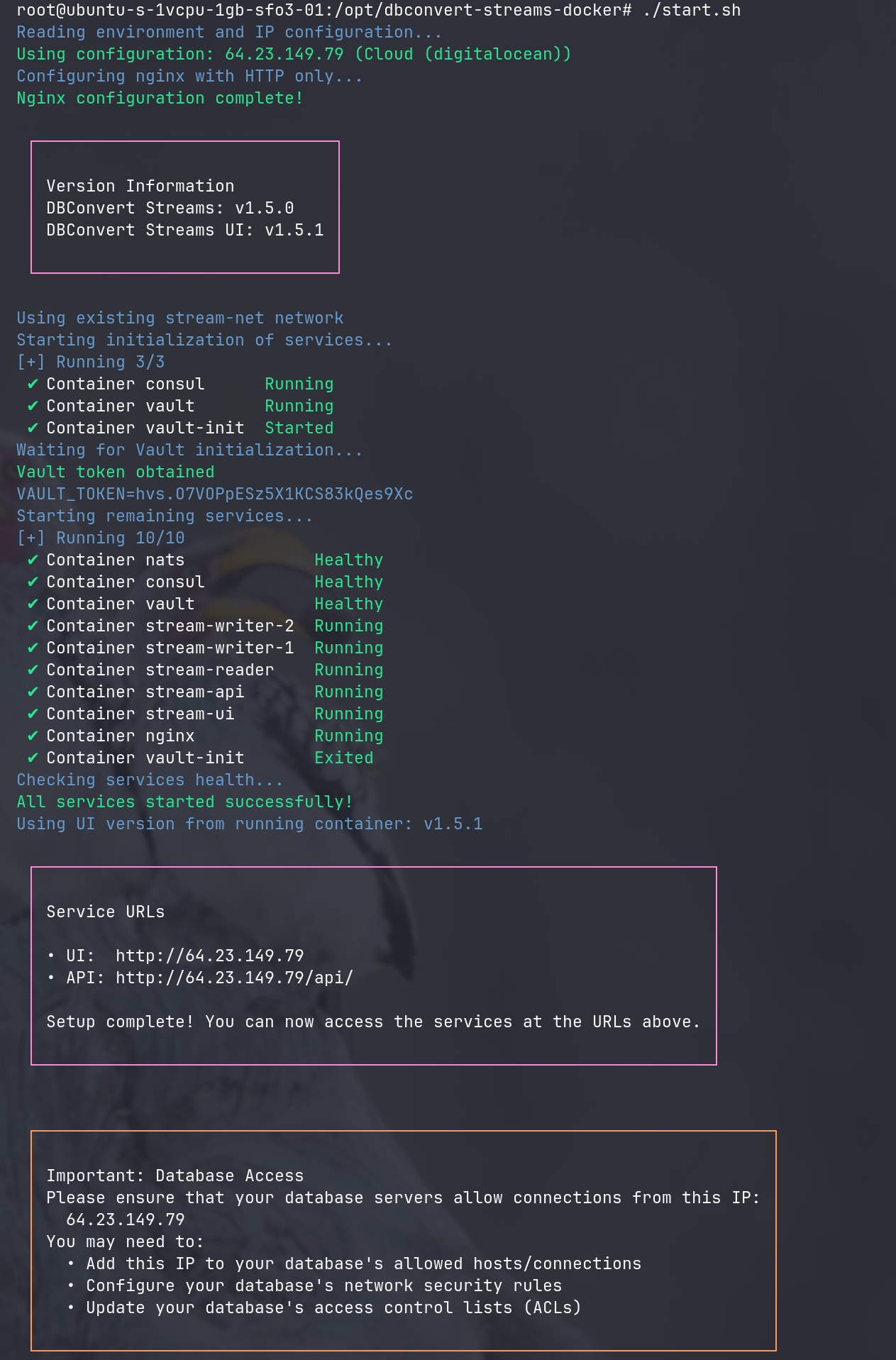
./start.sh             # For HTTP mode
# OR
./start.sh --secure    # For HTTPS mode with auto-generated certificates
3. Access the Web Interface
Upon successful deployment, the installer provides URLs for the web UI and API:
Service URLs

• UI:  http://YOUR-SERVER-IP
• API: http://YOUR-SERVER-IP/api/

Setup complete! You can now access the services at the URLs above.

Important: Database Access
Please ensure that your database servers allow connections from this IP:
    YOUR-SERVER-IP
You may need to:
    • Add this IP to your database's allowed hosts/connections
    • Configure your database's network security rules
    • Update your database's access control lists (ACLs)
4. Configure Your First Stream
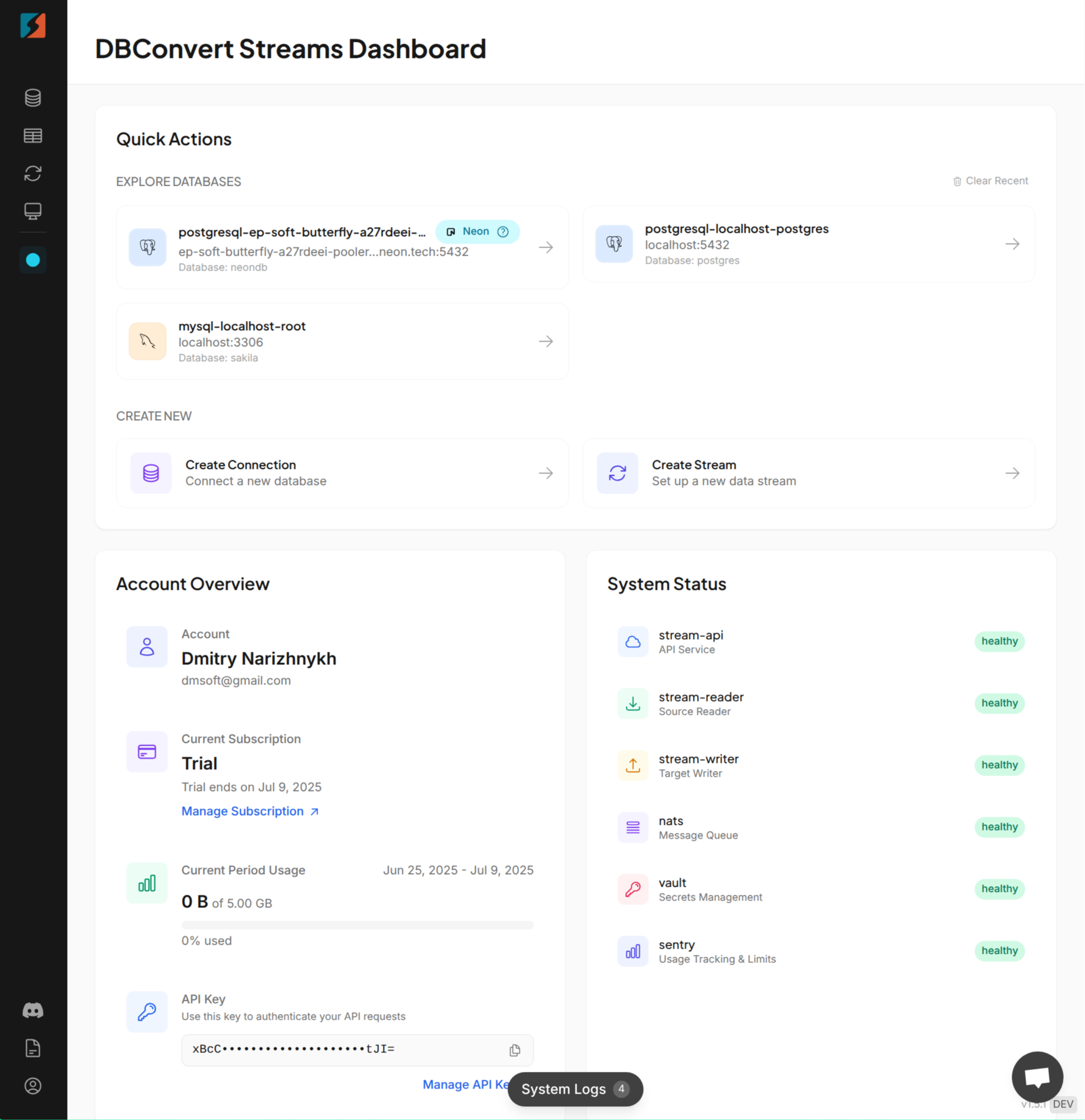
- Obtain your API key from streams.dbconvert.com/account.
- Enter the key in the web UI.
- Configure connections to your source and target databases.
- Choose your mode:
- CDC Mode for continuous, real-time data replication.
- Convert Mode for one-time bulk migration.
- Start the stream and monitor progress in real time. The platform will replicate data between the configured source and target databases in real time.
5. Monitor and Manage
DBConvert Streams offers comprehensive management capabilities:
- Web UI (No-Code): View real-time statistics, logs, and control streams with pause/resume/stop functions without writing any code.
- API Access: For automation and integration into existing workflows, use the RESTful API. Full documentation is available in the DBConvert Streams API Reference.
🔄 Updating DBConvert Streams
Keep your deployment up to date effortlessly with:
cd /opt/dbconvert-streams-docker
./update.sh
This updater script:
- Downloads the latest versions automatically.
- Performs rolling updates with zero downtime.
- Backs up configurations before updating.
- Validates services post-update to maintain data integrity.
🧹 Managing Your Deployment
Stopping Services
To gracefully stop all DBConvert Streams services:
cd /opt/dbconvert-streams-docker
./stop.sh
This command halts all running containers while preserving your configuration and data, allowing you to restart anytime with ./start.sh.
Uninstalling DBConvert Streams
To completely remove DBConvert Streams:
cd /opt/dbconvert-streams-docker
./uninstall.sh
🔐 Data Consistency, Integrity & Availability
Ensuring reliable, uninterrupted access to accurate data is at the heart of any successful database migration. DBConvert Streams supports this by maintaining strict consistency and integrity throughout the replication process—whether during real-time CDC operations or bulk transfers.
Its architecture is built for high availability and fault tolerance, ensuring that changes are captured and delivered without data loss, even across different database systems. Built-in validation tools and SQL-based transformation features help preserve data correctness while adapting to new schemas or environments.
By combining seamless synchronization with secure, real-time streaming, DBConvert Streams ensures your data remains consistent, trusted, and always available—no matter the complexity of your migration workflow.
DBConvert Streams revolutionizes database streaming and real-time data replication by combining enterprise-grade capabilities with deployment simplicity. Whether you run cloud database migration on AWS, leverage the network advantages of Google Cloud, or save up to 70% with Hetzner, the same powerful database sync tool deploys in minutes and scales to handle terabytes of data with high data availability and data consistency. Database replication is often referred to as database streaming, and there is typically no defined completion time for replication.
Ready to start streaming?
- Choose your deployment platform.
- Run the one-line installer.
- Configure your databases.
- Start real-time data replication immediately.
Your database streaming journey begins with a single command—no complexity, no vendor lock-in, just powerful, reliable database sync tools that work anywhere.
Get Started Today:
Need enterprise support or custom deployment assistance? Contact our team for personalized guidance.