How to Load Data into Snowflake: COPY INTO, Snowpipe and Snowpipe Streaming
Three ways in, one rule underneath: Snowflake ingestion appends. How COPY INTO, Snowpipe and Snowpipe Streaming work today, and what it takes to keep a table current from MySQL or PostgreSQL.
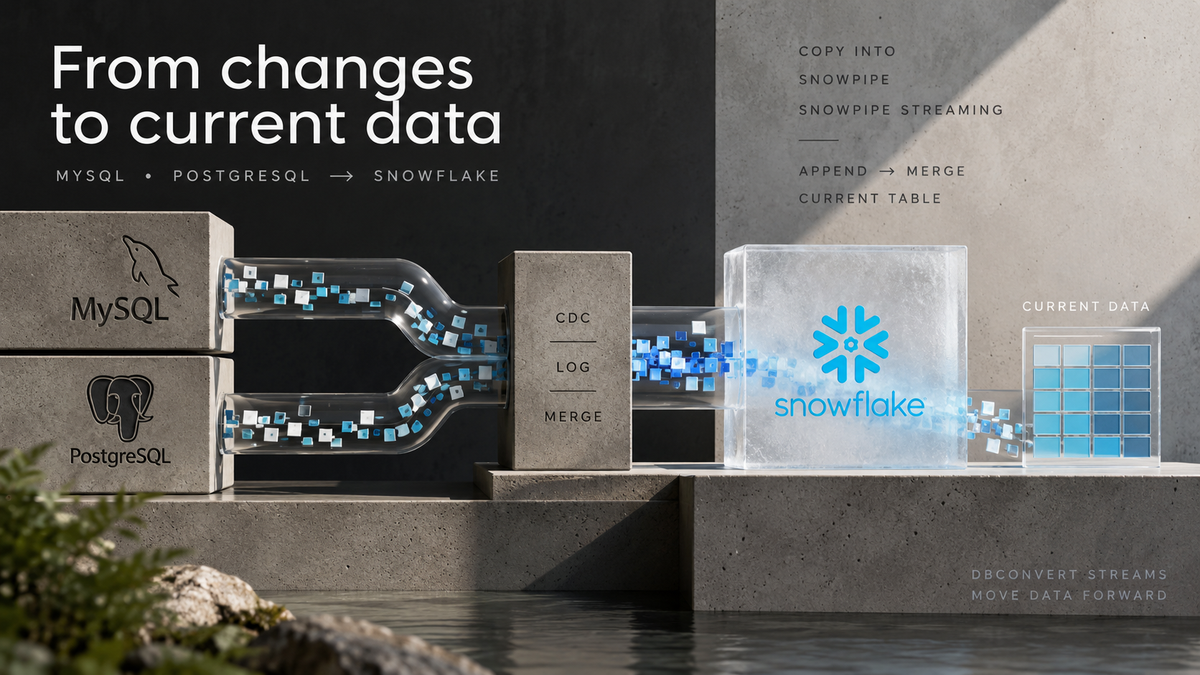
Snowflake has three ways to load data: COPY INTO, Snowpipe and Snowpipe Streaming. All three append. None of them can update or delete a row.
| Method | Data arrives as | Cost & freshness | DBConvert Streams |
|---|---|---|---|
COPY INTO |
Files on a stage | Your warehouse · your schedule | Load and backfills |
| Snowpipe | Files in a bucket | Serverless · minutes | Not used |
| Snowpipe Streaming | Rows via SDK or REST | Serverless · seconds | CDC from MySQL and PostgreSQL |
Keeping a table in step with a live MySQL or PostgreSQL database therefore takes a second step: a MERGE from an append-only change table into the table you query.
How DBConvert Streams does it:
- Load: rows are staged as Parquet, then one
COPY INTOper table. The run fails if Snowflake loaded fewer rows than were read. - CDC: binlog or WAL changes go through the Snowpipe Streaming REST API into a change table. A Snowflake task merges them into the table you query, every 1 minute to 1 hour.
Runs as a desktop app or in Docker on your own infrastructure, with nothing installed in your Snowflake account. Load and CDC streams start in evaluation.
Install DBConvert StreamsThe three ways in
COPY INTO: files, your warehouse, your schedule

You put files in a stage (the user stage @~, a named internal stage, or an external stage on S3, GCS or Azure) and run COPY INTO on a virtual warehouse.
- Billing: warehouse time, billed per second with a 60-second minimum every time the warehouse starts, resumes or is resized larger.
- File size: Snowflake's guidance is files of roughly 100–250 MB compressed.
- Load-time transformations:
COPY INTO … FROM (SELECT …)can reorder and cast columns and pull fields out of JSON as it loads. This is useful for simple mapping. Joins and business logic belong after the load.
COPY INTO analytics.public.orders
FROM @~/orders/
FILE_FORMAT = (TYPE = PARQUET USE_LOGICAL_TYPE = TRUE)
MATCH_BY_COLUMN_NAME = CASE_INSENSITIVE;
Snowpipe: files, serverless, as they arrive

Snowpipe runs the same kind of COPY statement, but Snowflake triggers it for you. An event notification from the bucket fires it on auto-ingest (S3 → SQS, SNS or EventBridge; GCS → Pub/Sub; Azure → Event Grid); a REST call fires it otherwise.
- Billing: since December 8, 2025 on Standard and Enterprise (August 2025 on Business Critical and VPS), Snowpipe charges a flat 0.0037 credits per GB. The old compute-plus-per-1,000-files model is gone. Text files such as CSV and JSON are measured uncompressed; Parquet, Avro and ORC are measured at their observed size, whatever the compression.
- Latency: rows are usually queryable within minutes of the file landing. Snowflake publishes no fixed figure, because it depends on file size and format.
- Setup you own: the storage integration, the stage, the bucket notification and the
PIPEobject. Most Snowpipe incidents come from these parts. The usual one is a notification that stopped firing.
Snowpipe Streaming: rows, no files

Rows go to a channel over an API. No stage, no files and no warehouse are involved in receiving them.
There are two architectures, and many guides still describe the classic one:
| Classic | High-performance | |
|---|---|---|
| Status | Supported today; planned for deprecation | GA on AWS, Azure and GCP |
| Clients | Java SDK | Java, Python and Node.js SDKs; REST API |
| Target | Table directly | PIPE object; server-side validation and transforms |
| Throughput | — | Up to 10 GB/s per table; typically under 10 seconds |
| Billing | Compute + client connections | Per uncompressed GB; no per-client charge |
The REST API matters more than the throughput figure. Streaming used to mean running a Java application. Now any process that can sign a JWT can stream rows into Snowflake.
What none of them do: update a row
Snowflake stores data in immutable micro-partitions. Changing one row rewrites the micro-partitions that hold it, so every ingestion path is built to add rows and nothing else.
A change stream from an OLTP database is not made of additions. It is inserts, updates and deletes, in order. CDC tools vary in how they model and apply those changes. DBConvert Streams uses this append-then-merge pattern:
- Append every change to a log table, with the operation (
I/U/D) and its position in the source log. - Collapse the log into current state with a
MERGEkeyed on the primary key, on a schedule.

The DIY version of step 2 looks like this, and every column in it is something you have to get right:
MERGE INTO orders t
USING (
  SELECT * FROM orders__changes
  QUALIFY ROW_NUMBER() OVER (PARTITION BY order_id ORDER BY _seq DESC, _ord DESC) = 1
) s
ON t.order_id = s.order_id
WHEN MATCHED AND s._op = 'D' THEN DELETE
WHEN MATCHED THEN UPDATE SET t.status = s.status, t.amount = s.amount
WHEN NOT MATCHED AND s._op <> 'D' THEN INSERT (order_id, status, amount)
  VALUES (s.order_id, s.status, s.amount);
Getting the SQL to run is the easy part. The traps are elsewhere:
- Ordering. Several changes can share one log position, so a single sequence column cannot order them.
- Re-applying. Without a stream or watermark, the next run merges the same changes again.
- Missing keys. A table with no primary key has nothing to collapse by. This is a hard limit, not a tuning problem.
- Schema drift. A column added at the source has to reach the log table, the
MERGEand the target.
A concrete pipeline: MySQL into Snowflake with DBConvert Streams
DBConvert Streams writes into Snowflake as a target, from MySQL, PostgreSQL or files, in two modes.
The connection: key pair, not password
Snowflake is blocking password sign-in for service users account by account between August and October 2026, and Snowpipe Streaming does not offer password authentication at all: it takes a key-pair JWT or OAuth. Use an RSA key pair: the connection form can generate one and shows the exact statement to run once in Snowsight:
ALTER USER loader SET RSA_PUBLIC_KEY = 'MIIBIjANBgkq...';
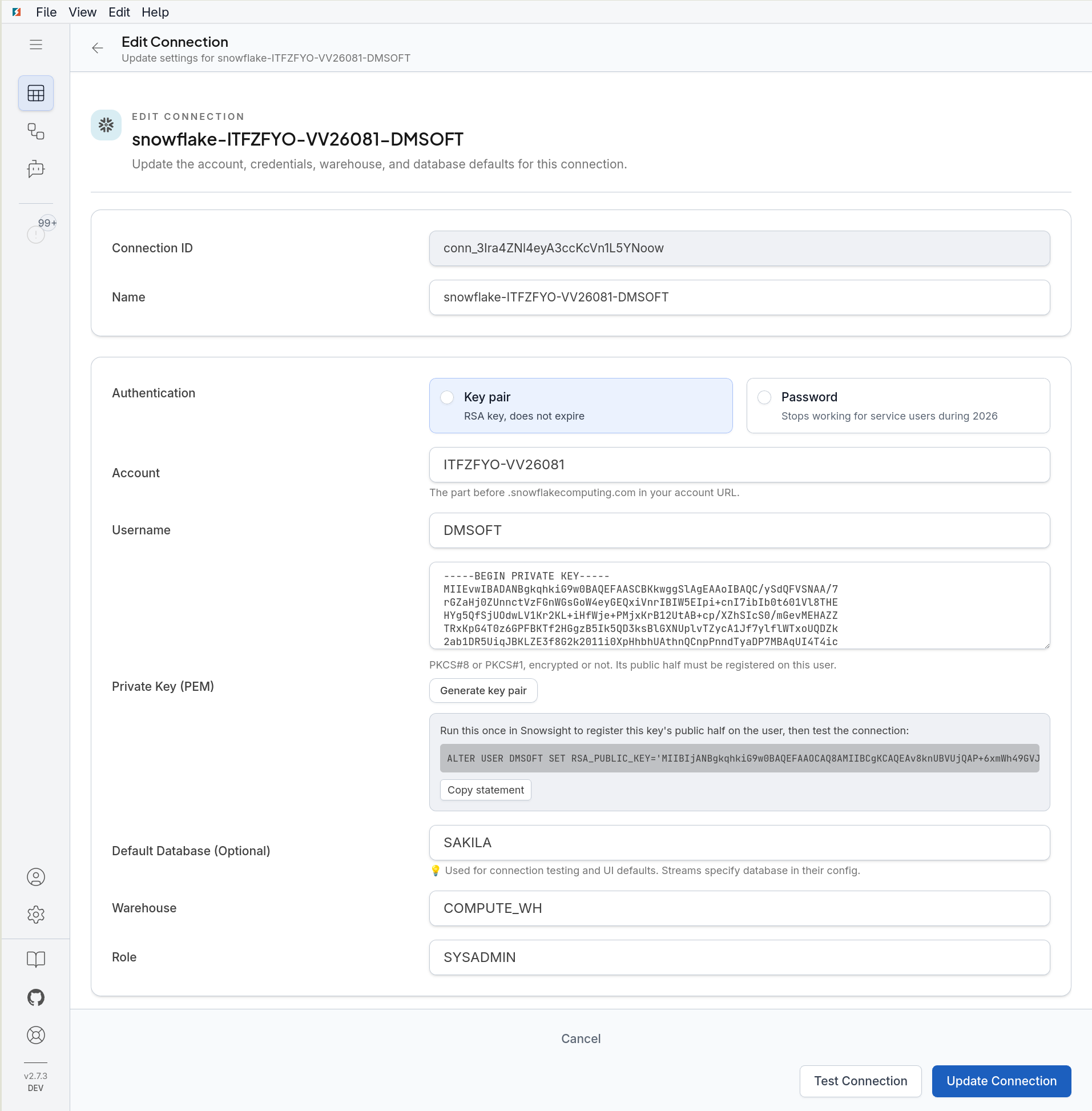
The private key stays with DBConvert Streams. Snowflake only ever receives the public half.
Load mode: one COPY INTO per table
For the initial copy of a commerce database, the stream does this:
- Structure. It creates the database, schema and tables under your schema policy. The defaults refuse to overwrite anything that already exists.
- Export. It writes rows locally as zstd-compressed Parquet part files.
- Upload. It
PUTs the files to your user stage@~. - Load. It runs one
COPY INTOper table withMATCH_BY_COLUMN_NAME = CASE_INSENSITIVEandUSE_LOGICAL_TYPE = TRUE, so a2005-05-25 11:30:37timestamp does not arrive as the year 37366 (what goes wrong without it). - Verify. It compares the rows Snowflake reports loading with the rows the stream read. A short load fails the run instead of being reported as a success.
Export, upload and COPY INTO are timed separately in the run monitor. When a load is slow, you can see whether the time went to the source, the network or the warehouse, and a bigger warehouse only speeds up the last of those.
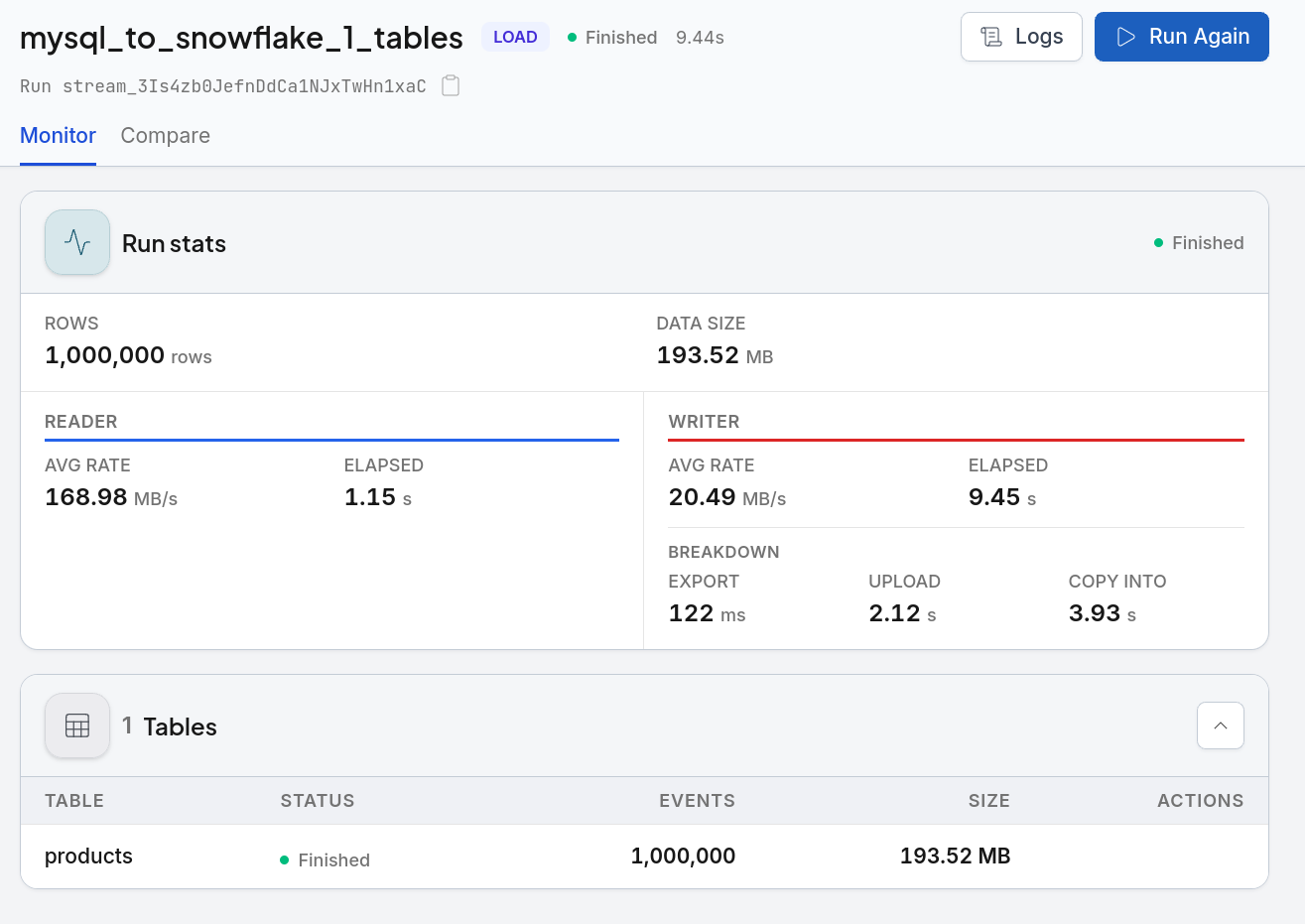
Three details worth knowing before you query the result:
- Table and column names are quoted and keep the source's case. A MySQL table
ordersbecomes"orders", so an unquotedSELECT * FROM ordersfolds toORDERSand will not find it; write"orders". - MySQL
BLOBcolumns arrive base64-encoded inVARCHAR, about 33% larger. - PostgreSQL
TIMESTAMPTZbecomesTIMESTAMP_TZ, and every other timestamp becomesTIMESTAMP_NTZ.
Connection fields, schema and write policies for re-runs, the stream configuration JSON and the queries to verify the result in Snowsight.
Read the Snowflake target guideCDC mode: Snowpipe Streaming, then a Snowflake task
For ongoing changes, DBConvert Streams reads the MySQL binlog or the PostgreSQL WAL and sends each change straight to the Snowpipe Streaming REST API. Nothing is staged and no user-managed virtual warehouse runs to receive the data.

For a source table ORDERS, the stream creates five objects:
| Object | What it is |
|---|---|
ORDERS__CHANGES |
Every change, appended, with _DBC_OP, _DBC_SEQ, _DBC_ORD and _DBC_TS |
ORDERS__CHANGES_PIPE |
The pipe that routes arriving rows into the change table |
ORDERS__CHANGES_STREAM |
A position: what has arrived since the last apply |
ORDERS__APPLY |
A Snowflake task carrying the MERGE |
ORDERS |
An ordinary table with the latest version of each row, deleted rows removed |
This is the same append-then-MERGE pattern described above, with one difference in where it runs: the collapse is a task on Snowflake's own scheduler. No runtime of ours sits beside your warehouse to run it.
Changes reach ORDERS__CHANGES within seconds. How often they reach ORDERS is a setting, from 1 minute to 1 hour in the wizard (5 minutes by default) and anything from one minute to eight days through the API.
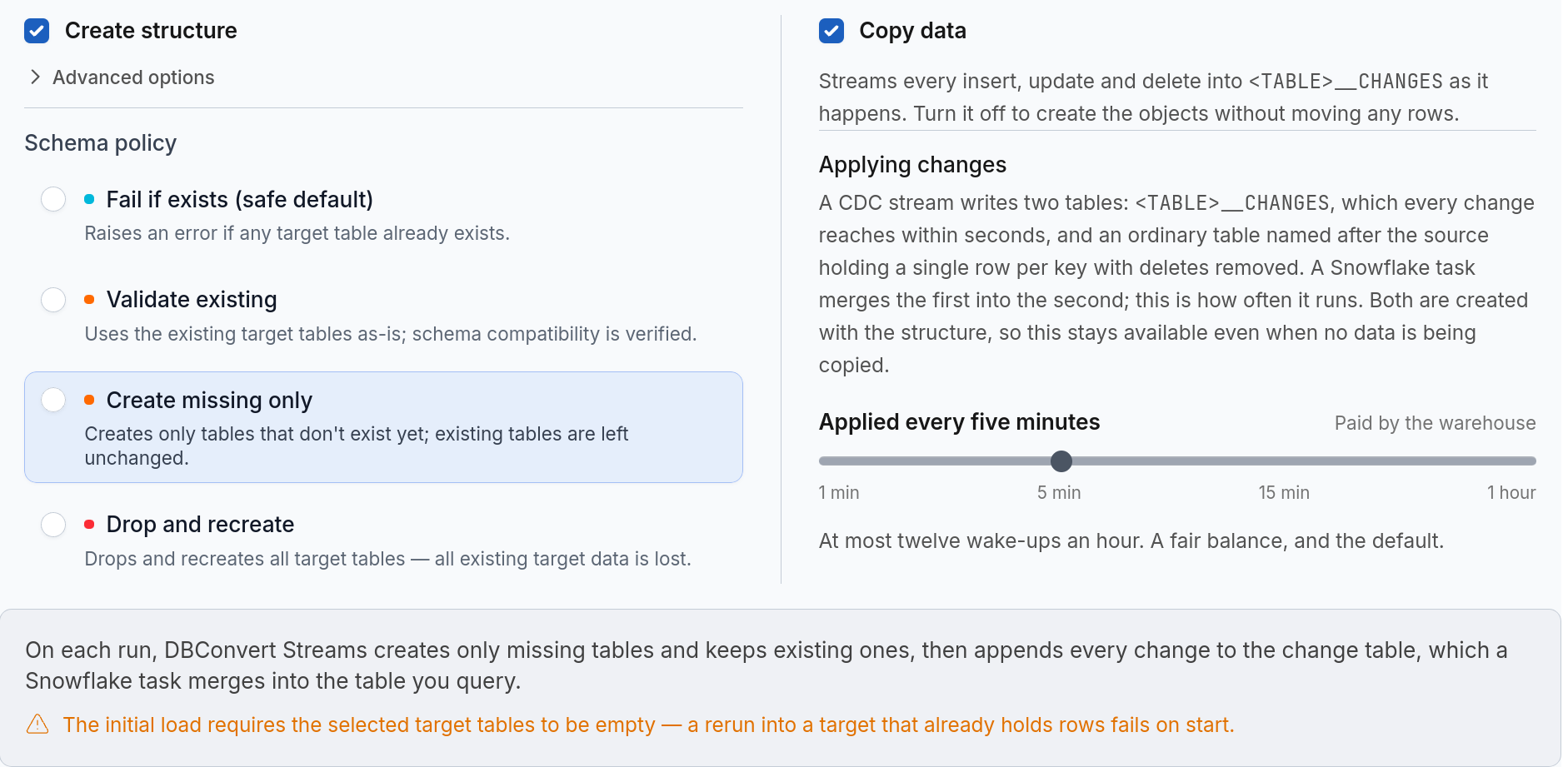
Each apply that finds work resumes the warehouse, with its one-minute minimum. An apply whose SYSTEM$STREAM_HAS_DATA check returns false skips the run and does not wake the warehouse. Because the function can return a false positive, an occasional empty run is still possible.
CDC needs three things a load does not:
- Key-pair authentication. A CDC stream on a password connection is refused before it starts.
- A primary key on every replicated table. Without one, the stream stops and says why.
EXECUTE TASKon the account, granted once by an administrator:
USE ROLE ACCOUNTADMIN;
GRANT EXECUTE TASK ON ACCOUNT TO ROLE loader_role;
Without that grant, changes land in ORDERS__CHANGES and never reach ORDERS. The stream reports it with the statement in the error, so you do not discover it later as an empty table.
When this matters
- Moving an OLTP database into Snowflake for the first time.
- Keeping analytics current from a MySQL or PostgreSQL database that sees updates and deletes, not just new rows.
- Retiring a hand-written
MERGEjob that someone wrote once and now nobody wants to own. - Moving off password authentication before your account's enforcement date.
- Needing Snowflake and database-to-database movement at once, for example MySQL → PostgreSQL next to MySQL → Snowflake, under one tool.
Where DBConvert Streams ends
- Snowflake is a target only. Nothing is read out of Snowflake into another system.
- CDC sources are MySQL and PostgreSQL. Files and S3 can be loaded into Snowflake, but they are not replicated as changes. For Oracle, SQL Server or SaaS sources, look at Snowflake's own Openflow connectors.
- No upsert in Load mode.
COPY INTOappends, so a re-run chooses betweentruncate_and_loadanddrop_and_recreate. - Reshaping happens at the source, in Load mode only. A custom
SELECT(joins, expressions, filters) can become its own table in Snowflake;COPY INTOitself matches columns by name and transforms nothing. CDC replicates tables as they are, so reshape changed data after it lands, in SQL or dbt. - No foreign keys and no clustering keys. Snowflake does not enforce foreign keys on standard tables, and clustering is a decision for whoever owns the warehouse.
- The change table grows. There is no retention setting yet. Changes that have already been applied are safe to delete, and
ORDERSkeeps every row. Deleting changes the task has not applied yet loses them. - Evaluation is limited. A Load run copies every row but masks text fields outside keys and relationships after 50 rows per table, and a CDC run stops after 2 hours. Clean output and ongoing replication need a paid seat (pricing).
The API field for the apply schedule, and how many warehouse wake-ups an hour each setting allows.
Read the CDC into Snowflake guideSnowflake loads rows in three ways and updates them in none. Choose your loader for how data arrives, and choose your pipeline for who owns the MERGE.