How to verify a database migration before cutover
A database migration can complete successfully while the actual values are wrong. Here’s how to compare MySQL and PostgreSQL directly before cutover.
The migration finished. Green status, every table created, source and target reporting the same number of rows. The maintenance window has forty minutes left in it and one question standing between you and the switch: is the data actually the same?
Row counts will not answer that. A row count tells you the rows arrived. It says nothing about what is inside them.
And plenty can change on the way across:
-
DATETIMEbecomes atimestamp, and the precision drifts; -
DECIMAL(12,2)lands in a column with a different scale, and the cents round; -
NULLbecomes an empty string, or an empty string becomesNULL; - value written at 11:00 reads back as 13:00, because something applied a time zone.
None of that raises an error. Every row was written successfully, so every tool involved is happy and the report says Completed.
You find out weeks later, when someone in finance notices a total is off by a few cents, and by then the source is gone.
So before you cut over, compare the data itself. Here is what that looks like when it takes ninety seconds instead of an afternoon.
Watch it catch one
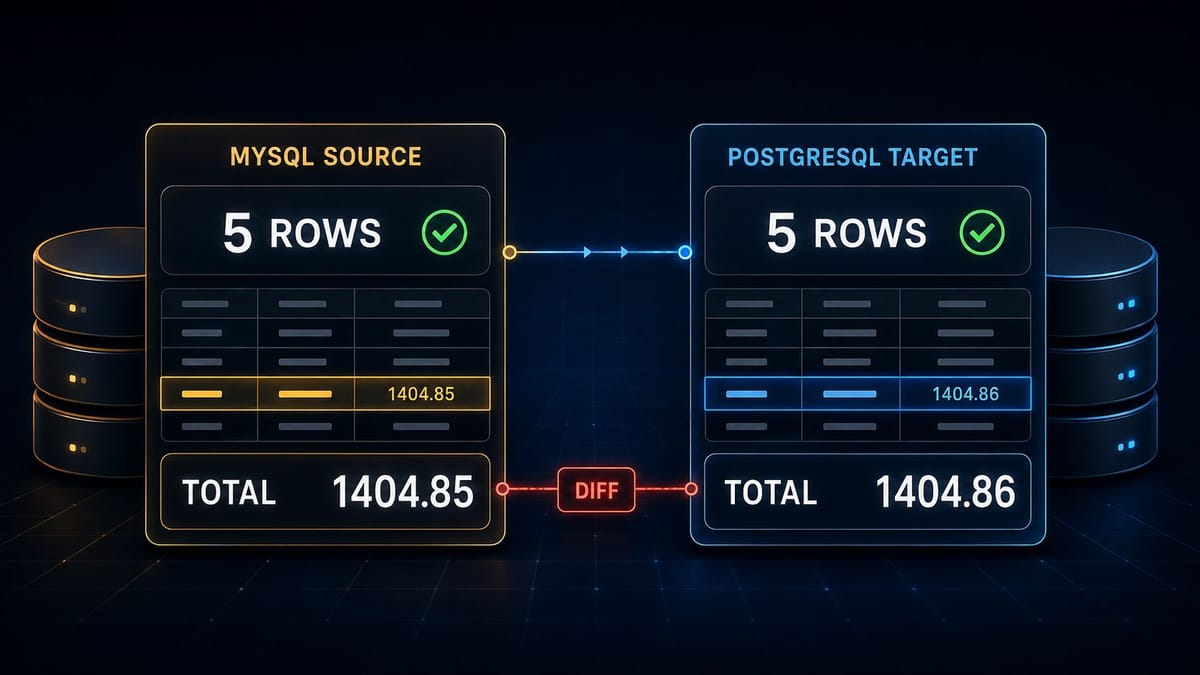
A MySQL database has already been migrated to PostgreSQL. Five orders, both sides, everything looks finished. One order_total on the target is one cent higher than the source: 89.76 against 89.75.
One cent, in one row out of five. Nothing on either screen looks wrong.
Validate Migration Data with Federated SQL & AIValidate Migration Data with Federated SQL & AI
Both databases are connected to the same SQL Console session and given short aliases, my1 and pg1. The checks go in as a plain sentence: row count, total revenue, smallest and largest order. From there the SQL is built against the live schemas and shown in the editor, so you can see exactly what is about to run, and the answer comes back in under a tenth of a second:
| Check | MySQL source | PostgreSQL target | Result |
|---|---|---|---|
| Row count | 5 | 5 | MATCH |
| Total revenue | 1404.85 | 1404.86 | DIFF |
| Minimum order | 89.75 | 89.76 | DIFF |
| Maximum order | 522.40 | 522.40 | MATCH |
The row count matches. The money does not. Minimum order even points at which row to open first.
That is the entire validation: one statement, two live databases, one answer you can act on.
Download DBConvert Streams and check your own migration
The version where you do it by hand
Now the same check without the tool.
You open a MySQL client and a PostgreSQL client. You write the aggregate query for the source, run it, and copy the numbers into a scratch file. You rewrite the same query in the other dialect, because the function names and the casting rules are not identical, run it against the target, and copy those numbers out too.
Now you line the two sets up and squint at them. Somewhere in there you notice that one side prints 1404.85 and the other prints 1404.850000, so you stop and fix the formatting before you can even tell whether they differ.
Then you do the next table.
For one table it is twenty minutes of annoyance. For eighty tables it is a project, and it is the kind of project people quietly abandon at 2am with "the row counts matched, ship it". Which is exactly how a wrong value gets into production with a green checkmark behind it.
The alternative most teams reach for is a reconciliation script: dump both sides, load them somewhere, diff them. That works, and it is another thing to write, run, and maintain, at the moment you have the least attention to spare.
One session, both databases, one result
DBConvert Streams connects the source and the target to the same SQL Console, so one query can read both live databases at once. No export, no staging tables, no script.
The loop is short enough to run repeatedly:
- Connect both databases and open them in one session.
- Say what you want verified, in your own words and in whatever language you think in.
- Press Run and read the
DIFFrows.
That is the whole thing. You do not have to write the cross-database query, remember how each dialect spells a cast, or look up what the target called that column after the schema was translated. You describe the check and get an answer.
If you would rather write the SQL yourself, nothing is in your way: it is a normal SQL editor, and the only unusual part is that my1 and pg1 are both in scope at once. The syntax for reaching across connections is one line of documentation. Most people describe the first check, then edit the query from there.
What makes it stick is the small stuff around that loop:
- You do not have to touch the SQL, and it is right there if you want to. It lands in the editor rather than in a black box. Read it or ignore it, tweak one aggregate, save the tab, and run the same validation again after the next migration.
- Nothing runs behind your back. The statement appears first, you press Run second.
- The results are a workspace. Four rows or four hundred thousand, page through them, filter them, and export to CSV, JSON, or Excel when someone wants the evidence attached to the change ticket.
- The schemas come from the live databases. No pasted DDL, no guessing at column names, no keeping a copy of the schema in your head while you write the query.
- It is fast enough to be a habit. The demo above returns in 80 milliseconds. Real tables are the interesting case, so see below.
Ask for the checks that would actually hurt
The prompt in the demo is deliberately ordinary:
Compare the source and target orders tables. Check the row count, total revenue, minimum order value, and maximum order value. Return one row per check with source, target, and status.Start with the columns that would cost you something if they were wrong, then widen:
- Sums on money and quantities. A rounded decimal or a mangled numeric type leaves the row count perfect and the total off.
- Minimum and maximum. Type problems live at the ends of the range, and they show up there long before they move a total enough to notice.
- Earliest and latest timestamps. A time zone applied somewhere in the pipeline shows as the same shift at both ends.
- Non-
NULLcounts on the columns that must never be empty. Every row present, one column silently blank, is a classic. - A few known rows by primary key, for the records the business would notice first.
- Every row against every row, when a table matters enough to be certain about. This one compares full rows in both directions, so it catches a missing row, an extra row, and a changed value in a single pass.
It does not fall over on a real table
Five orders make a clear demo and prove nothing about scale, so here is the same thing on the employees sample database, migrated from MySQL to PostgreSQL. Its salaries table holds 2.84 million rows, and the whole schema is just under four million rows a side.
Three checks, all of them run from one editor against both live databases:
| Check | Rows scanned | Time |
|---|---|---|
| Row count for all six tables, one statement | 7.8 million | 0.29 s |
salaries: count, sum, min, max, earliest and latest date |
5.7 million | 0.68 s |
salaries: every row compared on every column, both directions |
5.7 million | 6.2 s |
The totals came back identical to the unit, 181,480,757,419 on both sides, and the row-level pass found nothing: no row in the source without an exact twin in the target, and none the other way round.
That last one is the strict check, the one people skip because it sounds expensive. It compares whole rows rather than summaries, so a single wrong value anywhere in the table has nowhere to hide. To be sure it can actually see one, we re-ran it with one salary in the source raised by a single unit, and it came back with exactly one row on each side: the changed version that the target does not have, and the original that the source no longer has.
One value in 2.8 million rows, found in six seconds, on a table where doing it by hand means two exports and a script. Those timings are from the installed build, the same one behind the download link below.
What lands in front of you either way is a handful of rows, not two tables to diff by hand. The reading and the comparing both happen inside the query; you get the verdict.
Those timings are from two databases on one machine, which is the usual shape of a migration rehearsal. Across a network the aggregate checks stay cheap, and the strict row-by-row pass has to read both tables, so give it room on a table with tens of millions of rows. That is the honest trade: run the cheap checks on everything, run the strict one on what matters.
The same app already did the migration
Validation is the last step, not a separate product. The application that compares the two databases is the one that moved the data in the first place.
It converts MySQL to PostgreSQL (and the other direction, and to Snowflake, Parquet, CSV, or JSONL) without migration scripts, translates the schema for you, and shows rows and throughput while it runs. When the copy is done, keep it in sync with change data capture until the moment you cut over, then run the comparison once more against a target that is still current.
One tool for the move, the sync, and the proof that the move was clean.
Try it on your own migration
The IDE and SQL Console are free. Install on Windows, macOS, or Linux, connect a source and a target, and ask it to compare the table you would least like to be wrong about.
It takes about as long as reading this page.