MySQL CDC: Real-Time Replication with Binlog
Binlog setup is the easy part. What actually breaks MySQL CDC in production: the initial load, staying in sync during migration, and silent divergence.
Most MySQL CDC guides stop at "enable binlog and stream changes".
In practice, that’s not the hard part.
What actually breaks:
- initial load of existing data
- keeping systems in sync during migration
- verifying that nothing silently diverged
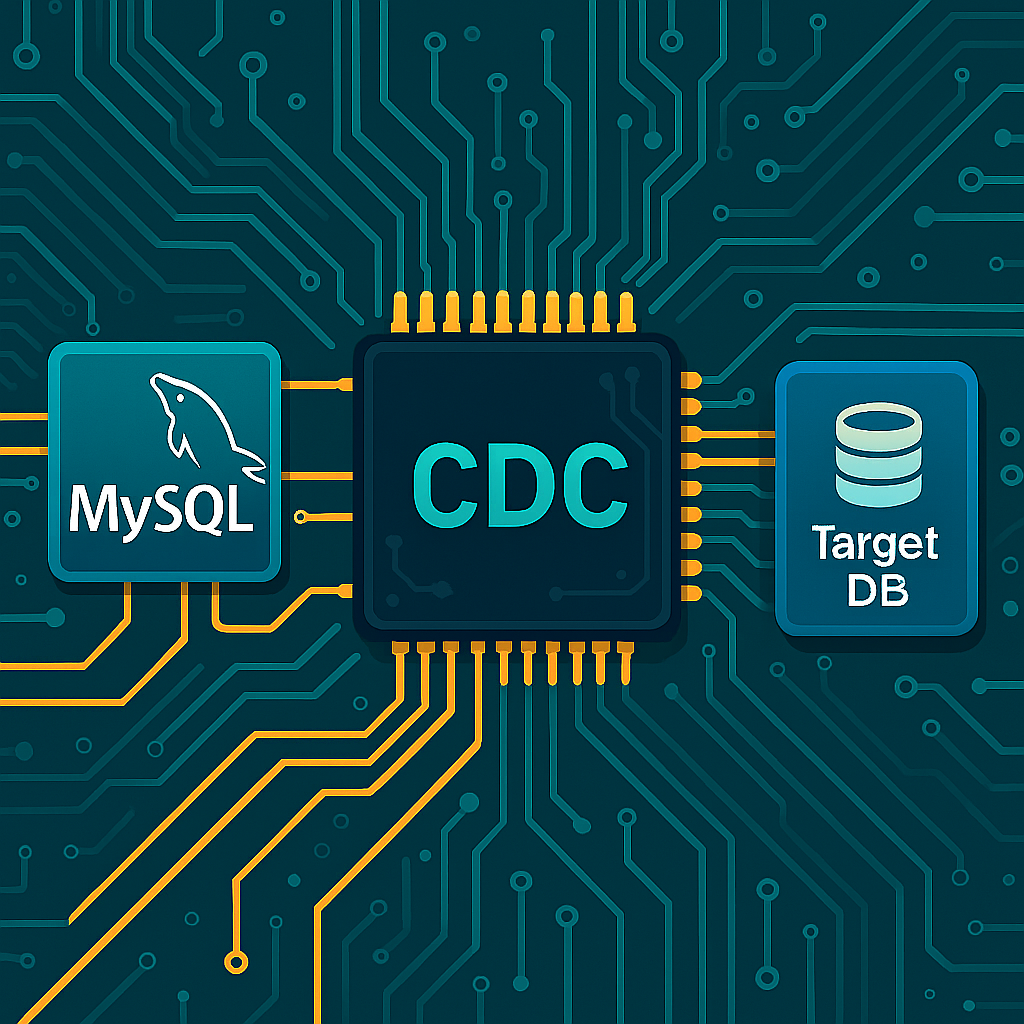
MySQL Change Data Capture (CDC) solves one piece of the problem: capturing changes in real time.
This guide covers how MySQL CDC works, how it’s actually used in production, and what to watch out for beyond just reading the binlog.
What is MySQL Change Data Capture (CDC)?
MySQL Change Data Capture (CDC) is a way to track and stream changes from a database in real time.
Instead of scanning full tables, CDC reads only what changed: inserts, updates, and deletes.
In MySQL, this is typically done using the binary log (binlog), which records every data modification as a sequence of events.
These events can then be applied to another system, keeping it in sync with the source database.
Core Components of MySQL CDC
At a high level, MySQL CDC is simple:
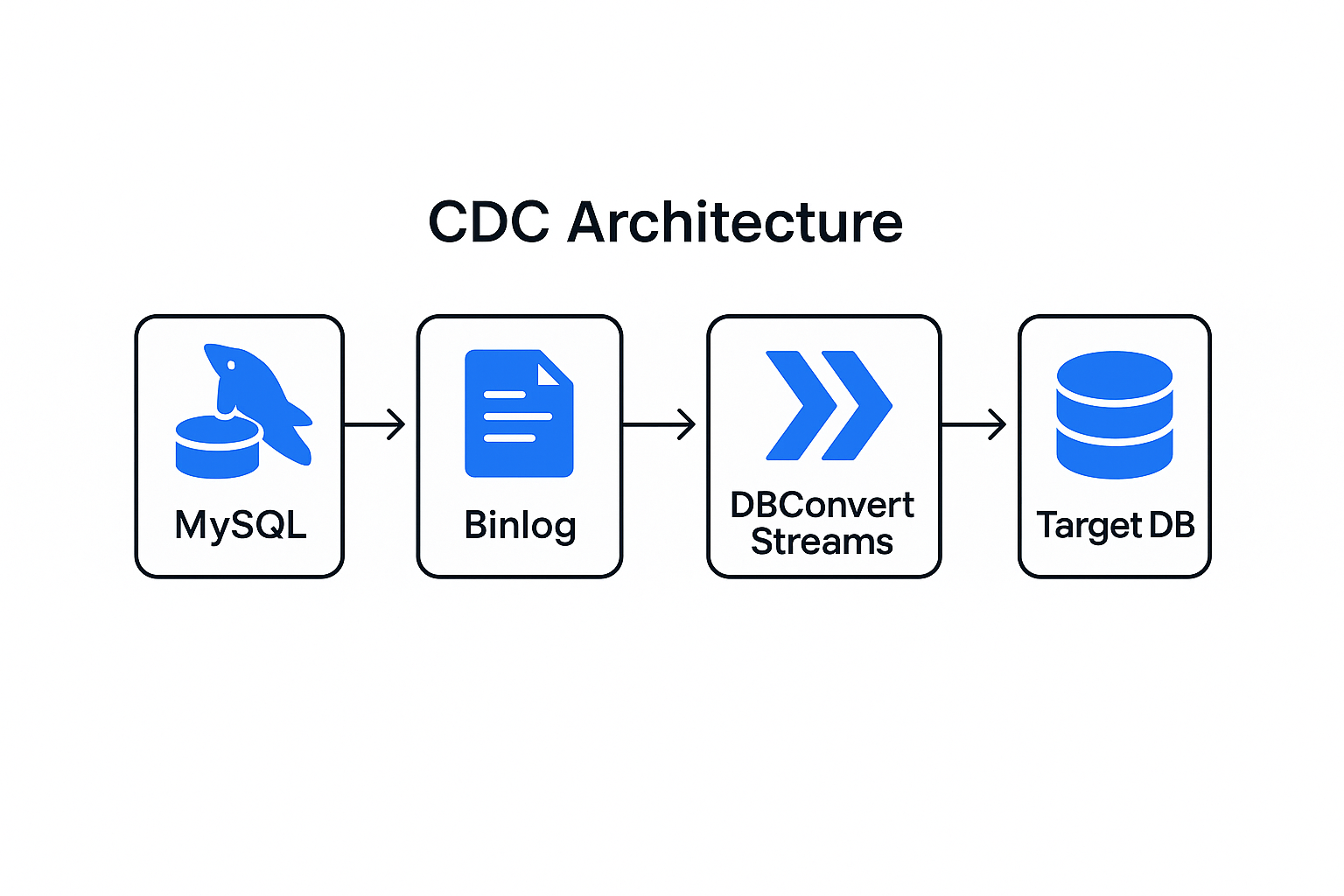
- MySQL writes every change to the binlog
- A reader parses those events
- Changes are applied to a target system
The binlog is just a sequence of events describing row-level changes.
Everything else - ordering, retries, consistency - is where things get tricky.
Why Implement MySQL Change Data Capture?
Real-Time Data Synchronization
Traditional batch ETL processes create significant latency between data changes and their availability in target systems. MySQL excels as a transactional database, but organizations often need real-time analytics and reporting workflows that batch processing cannot support effectively.
MySQL CDC enables the creation of real-time data pipelines, providing millisecond-level synchronization between your mysql instance and downstream systems. This real-time processing capability is crucial for:
- Financial Applications: Instant fraud detection and risk assessment
- E-commerce Platforms: Real-time inventory updates and personalization
- IoT Systems: Immediate sensor data processing and alerting
- Gaming Applications: Live leaderboards and player activity tracking
Performance and Resource Optimization
Implementing cdc significantly reduces operational complexity and resource consumption compared to traditional data extraction methods. Instead of extracting data by performing full table scans that waste resources, MySQL CDC processes only actual data changes.
This efficiency translates to:
- Reduced Database Load: No more recurring polling or bulk extracts during peak hours
- Lower Network Traffic: Only changed records traverse the network
- Minimized Storage Costs: Smaller data transfers and reduced staging requirements
- Improved Scalability: Systems handle growing data volumes without proportional resource increases
Event-Driven Architecture Support
Modern applications increasingly rely on event-driven architectures where services react to data changes rather than requesting information. MySQL change data capture enables this paradigm by converting database modifications into discrete events that can trigger downstream processes.
This architectural approach supports:
- Microservices Integration: Services stay synchronized without tight coupling
- Real-time Analytics: Business intelligence systems receive instant updates
- Cache Invalidation: Automatic cache updates when source data changes
- Audit and Compliance: Complete change tracking for regulatory requirements. CDC also allows organizations to track data changes for both regulatory and analytical purposes.
MySQL CDC Implementation Methods Comparison
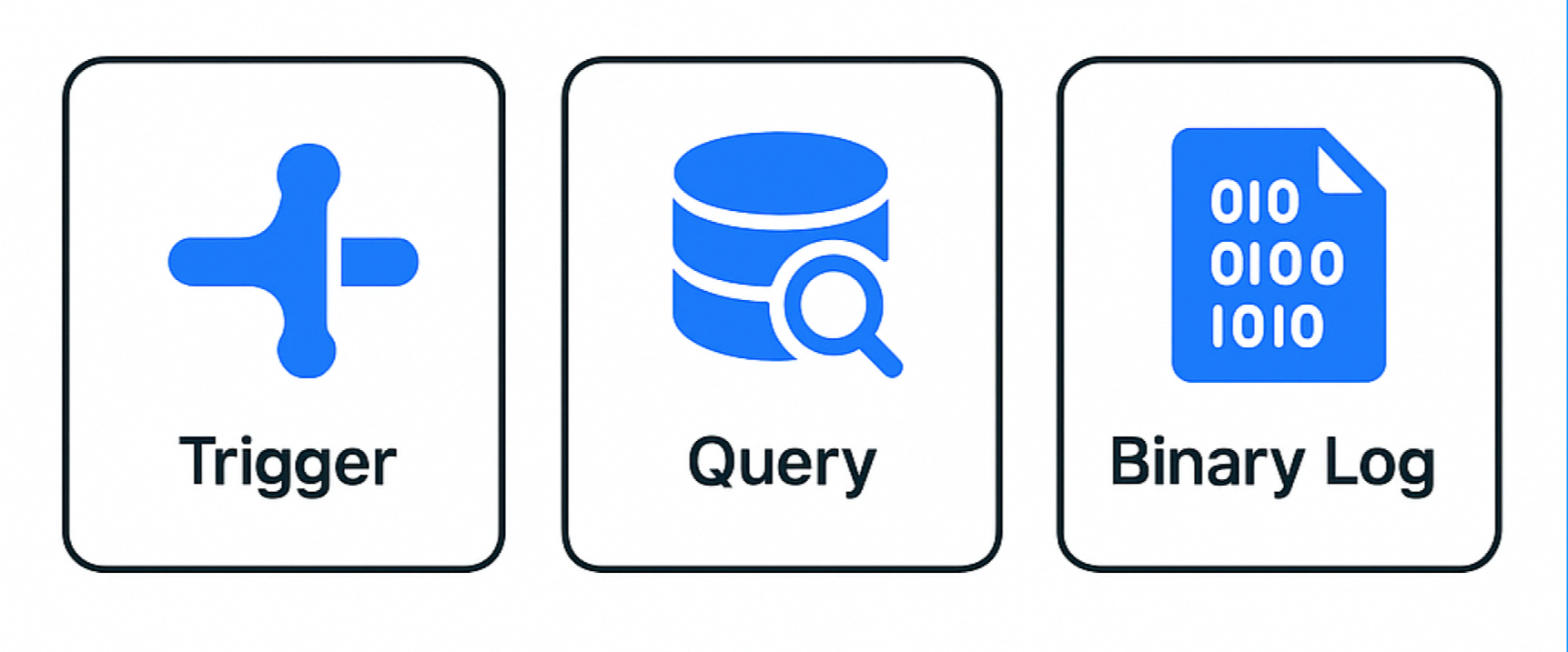
Organizations can implement change data capture through three primary approaches. Here's a comprehensive comparison:
In practice, almost all production setups use binlog-based CDC.
Trigger-based and timestamp-based approaches still exist, but they don’t scale well and are rarely used in real systems.
| Method | Latency | Performance Impact | Complexity | MySQL Version | Use Case |
|---|---|---|---|---|---|
| Trigger-based | Real-time | High | Low | Any | Small-scale, immediate capture |
| Query-based | Minutes | Medium | Low | Any | Moderate volume, simple setup |
| Binary log | Milliseconds | Minimal | High | 5.7+ | Production, high-volume |
Trigger-Based CDC Implementation
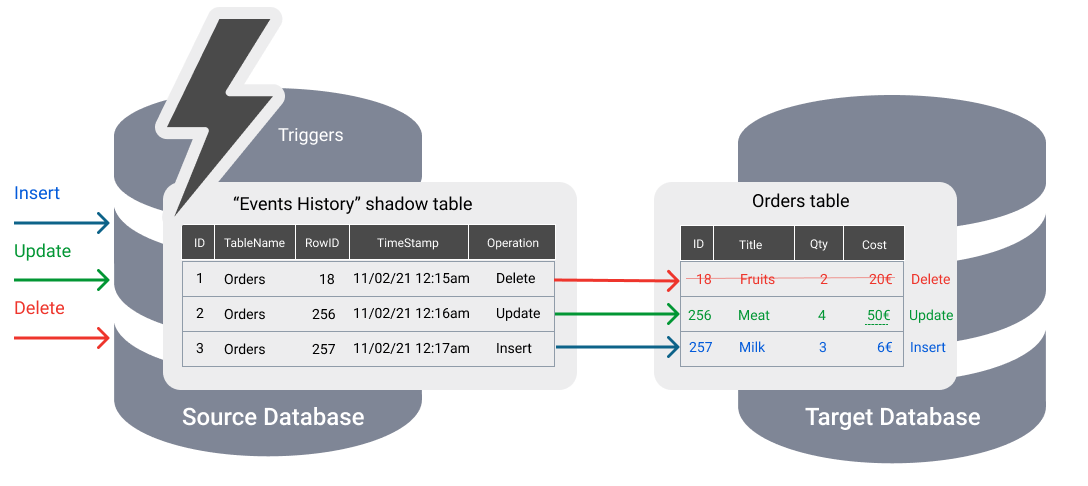
Trigger-based CDC uses MySQL triggers that automatically execute on INSERT, UPDATE, and DELETE operations to capture change events. With this method, change data is captured and logged inside MySQL before being transferred to external systems. The audit log table maintains a record of changes from the original table, ensuring a consistent history of modifications. This approach provides immediate change detection but comes with performance considerations.
-- Example trigger for capturing INSERT operations
CREATE TRIGGER audit_insert_trigger
AFTER INSERT ON customers
FOR EACH ROW
BEGIN
    INSERT INTO audit_log (
        table_name,
        operation_type,
        record_id,
        changed_data,
        timestamp
    ) VALUES (
        'customers',
        'INSERT',
        NEW.customer_id,
        JSON_OBJECT('new_data', JSON_OBJECT('name', NEW.name, 'email', NEW.email)),
        NOW()
    );
END;
Advantages:
- Immediate change capture with zero latency
- Complete control over captured metadata
- Works with any MySQL version
- Can capture user information and custom business logic
Limitations:
- Performance impact on transactional operations
- Additional load on the primary mysql server
- Complex maintenance across schema changes
- Requires careful testing in production environments
Traditional MySQL synchronization tools rely on trigger-based approaches for change tracking and data replication.
Query-Based CDC with Timestamps
Query-based CDC involves periodic execution of a recurring sql query to identify changed rows using a timestamp column indicating last modification time. In this approach, the query layer is responsible for polling the database for changes by executing these sql queries based on timestamp columns. This approach requires existing timestamp columns or schema modifications to track changes.
-- Example query-based CDC for identifying recent changes
SELECT
    customer_id,
    name,
    email,
    last_updated
FROM customers
WHERE last_updated > '2024-01-01 10:00:00'
ORDER BY last_updated;
The MySQL Event Scheduler can automate these queries:
-- Create scheduled event for periodic CDC
CREATE EVENT cdc_extract_customers
ON SCHEDULE EVERY 5 MINUTE
DO
BEGIN
    INSERT INTO cdc_staging
    SELECT * FROM customers
    WHERE last_updated > (
        SELECT MAX(last_processed)
        FROM cdc_checkpoint
        WHERE table_name = 'customers'
    );

    UPDATE cdc_checkpoint
    SET last_processed = NOW()
    WHERE table_name = 'customers';
END;
Advantages:
- Simple implementation and maintenance
- Minimal impact on transactional performance
- Easy to understand and troubleshoot
- Works well for moderate-volume changes
Limitations:
- Cannot detect DELETE operations without soft deletion patterns
- Polling intervals create latency in change detection
- Requires schema modifications for timestamp tracking
- May miss rapid successive changes to the same record
- Running frequent sql queries when no data has changed wastes resources and can impact performance
Binary Log CDC for Real-Time Processing
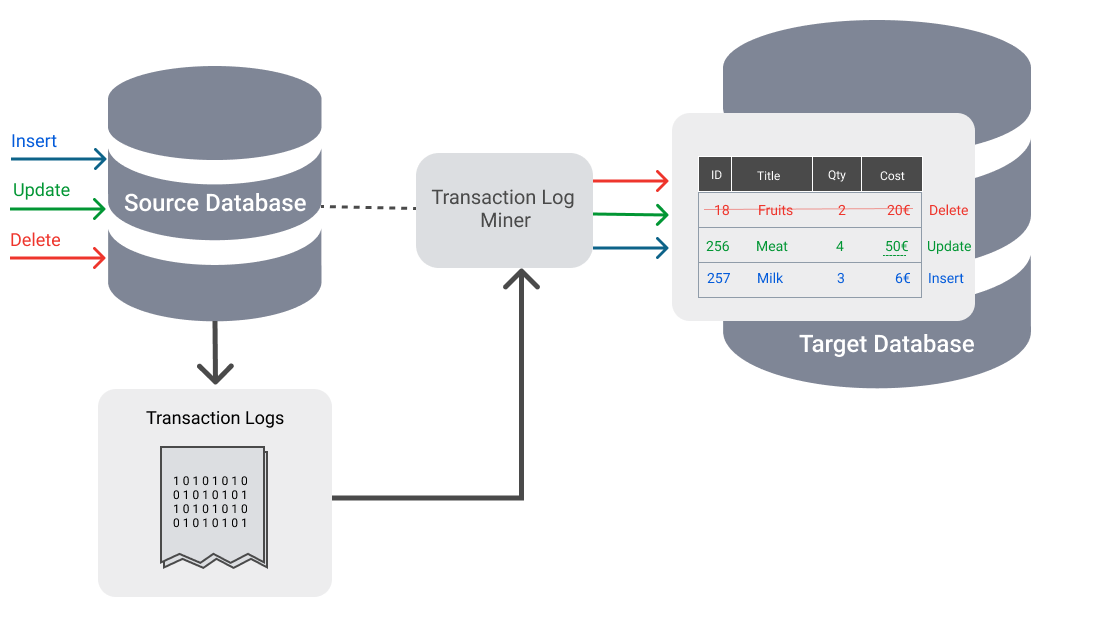
Binary log CDC leverages the mysql binary log (binlog), which is stored as a binary file on disk and records all data-changing operations as a sequential binary stream. The binlog enables real-time, event-driven data synchronization without impacting database performance. This approach provides the most efficient real-time change capture with minimal performance impact on the source database.
-- Enable binary logging with appropriate settings
SET GLOBAL binlog_format = 'ROW';
SET GLOBAL binlog_row_image = 'FULL';
SET GLOBAL log_bin = ON;

-- Check MySQL version compatibility
SELECT VERSION();
-- Minimum requirements: MySQL 5.7+ for full CDC support
The mysql binlog captures every change with complete before and after images:
# Example binlog entry (simplified)
### INSERT INTO test.customers
### SET
###   @1=1001 /* customer_id */
###   @2='John Doe' /* name */
###   @3='[email protected]' /* email */
###   @4='2024-01-01 10:30:00' /* created_at */
Advantages:
- Millisecond-latency change capture
- Zero performance impact on transactional workload
- Complete change history with full row images
- Supports all DML operations including DELETE events
Limitations:
- Requires binary logging configuration
- More complex setup and monitoring
- Network bandwidth considerations for high-volume systems
- Requires specialized tools for binlog parsing
Configuring MySQL for CDC Events
Proper MySQL configuration is essential for reliable change data capture implementation. Part of the configuration process involves identifying the monitored table whose changes will be captured by CDC. Although CDC is beneficial, it requires careful configuration for effective implementation in MySQL. This section covers the required settings, permissions, and monitoring setup for production CDC systems.
Enable Binary Logging
Binary logging must be enabled with specific settings to support CDC operations. Many managed MySQL services, including AWS RDS and Google Cloud SQL, offer support for the MySQL binlog, simplifying the setup process for CDC in cloud environments.
-- Check current binary log status
SHOW VARIABLES LIKE 'log_bin';
SHOW VARIABLES LIKE 'binlog_format';
SHOW VARIABLES LIKE 'binlog_row_image';

-- Configure binary logging (requires restart)
SET GLOBAL binlog_format = 'ROW';
SET GLOBAL binlog_row_image = 'FULL';
SET GLOBAL server_id = 1;
For managed mysql services like Amazon RDS or Azure Database, modify the parameter group:
# RDS Parameter Group Settings
binlog_format = ROW
binlog_row_image = FULL
log_bin_trust_function_creators = 1
Create CDC Database User
Create a dedicated database user with the required permissions for CDC operations:
-- Create CDC user with necessary privileges
CREATE USER 'cdc_user'@'%' IDENTIFIED BY 'secure_password';

-- Grant essential CDC permissions
GRANT SELECT, REPLICATION CLIENT, REPLICATION SLAVE ON *.* TO 'cdc_user'@'%';

-- Additional permissions for comprehensive CDC
GRANT LOCK TABLES ON *.* TO 'cdc_user'@'%';
GRANT SHOW DATABASES ON *.* TO 'cdc_user'@'%';

-- Grant lock tables permission for consistent snapshots
GRANT RELOAD ON *.* TO 'cdc_user'@'%';

FLUSH PRIVILEGES;

-- Security best practice: use minimal privileges
-- Never grant unnecessary permissions beyond CDC requirements
Verify Configuration
Confirm your MySQL configuration supports CDC operations:
-- Verify binary log configuration
SHOW MASTER STATUS;
SHOW BINARY LOGS;

-- Check replication settings
SHOW VARIABLES LIKE 'server_id';
SHOW VARIABLES LIKE 'gtid_mode';

-- Monitor binary log file size and retention
SHOW VARIABLES LIKE 'max_binlog_size';
SHOW VARIABLES LIKE 'expire_logs_days';

-- Monitor CDC pipeline health
SHOW VARIABLES LIKE 'log_bin_trust_function_creators';
SELECT COUNT(*) FROM information_schema.processlist
WHERE command LIKE '%Binlog%';
Popular MySQL CDC Tools and Platforms
DBConvert Streams: MySQL CDC without Kafka
Most CDC setups require extra infrastructure: Kafka, connectors, separate pipeline tools.
DBConvert Streams takes a simpler approach:
– reads MySQL binlog directly
– replicates data to the target
– no external infrastructure
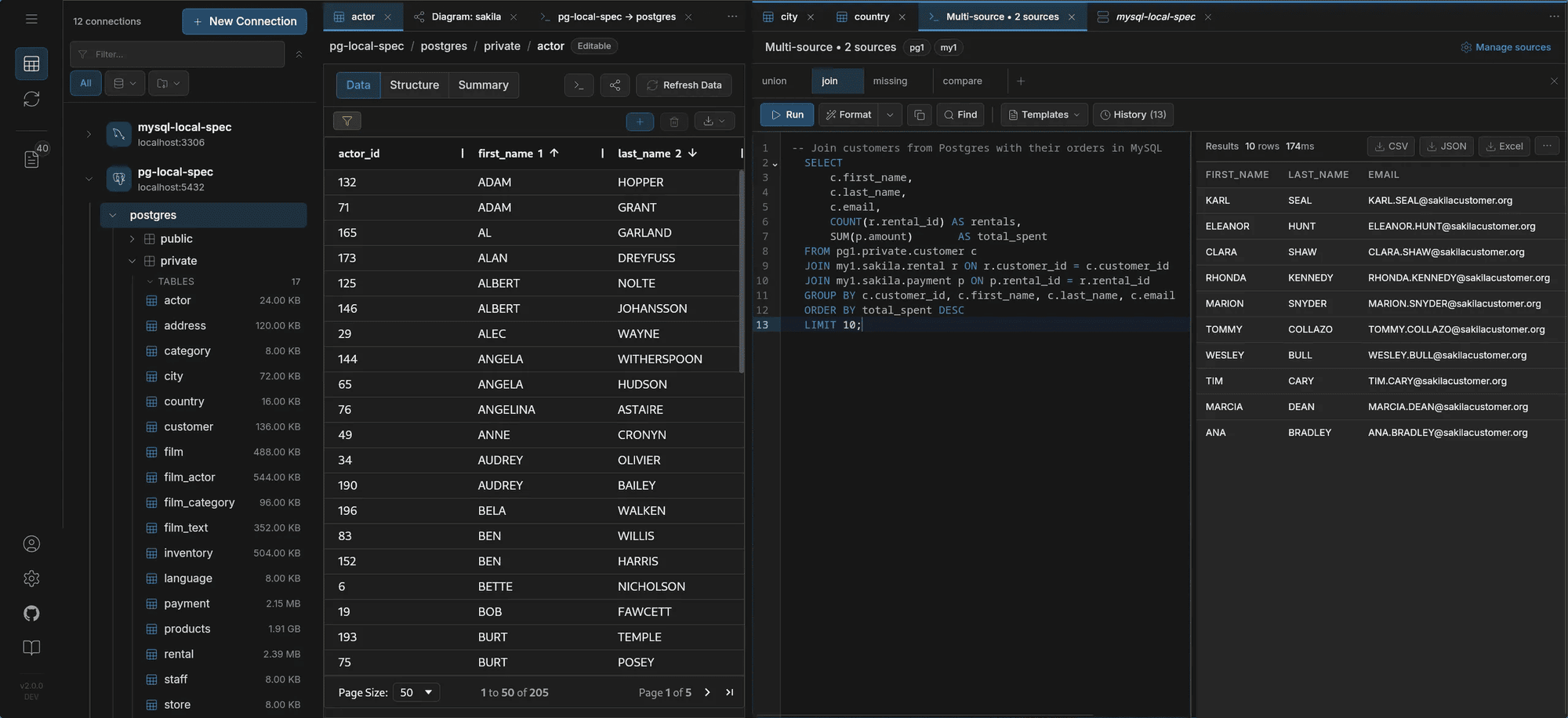
It also combines CDC with a database interface.
You can:
– explore data
– run queries
– verify results before and after replication
in the same place.
Why Choose DBConvert Streams for MySQL CDC?
Zero-Configuration CDC Setup Unlike traditional tools requiring extensive MySQL configuration, DBConvert Streams automatically detects optimal settings and configures your CDC pipeline in minutes, not days.
Performance at Scale
- Process 1M+ records in about 4 seconds (~100 MB/s)
- <50ms end-to-end latency
- Minimal impact on source MySQL performance
- Handles high-volume production workloads efficiently
Enterprise Features
- Built-in error recovery and retry logic
- Real-time monitoring dashboard with comprehensive metrics
- Multi-target replication support
- SSL/TLS encryption for secure data transmission
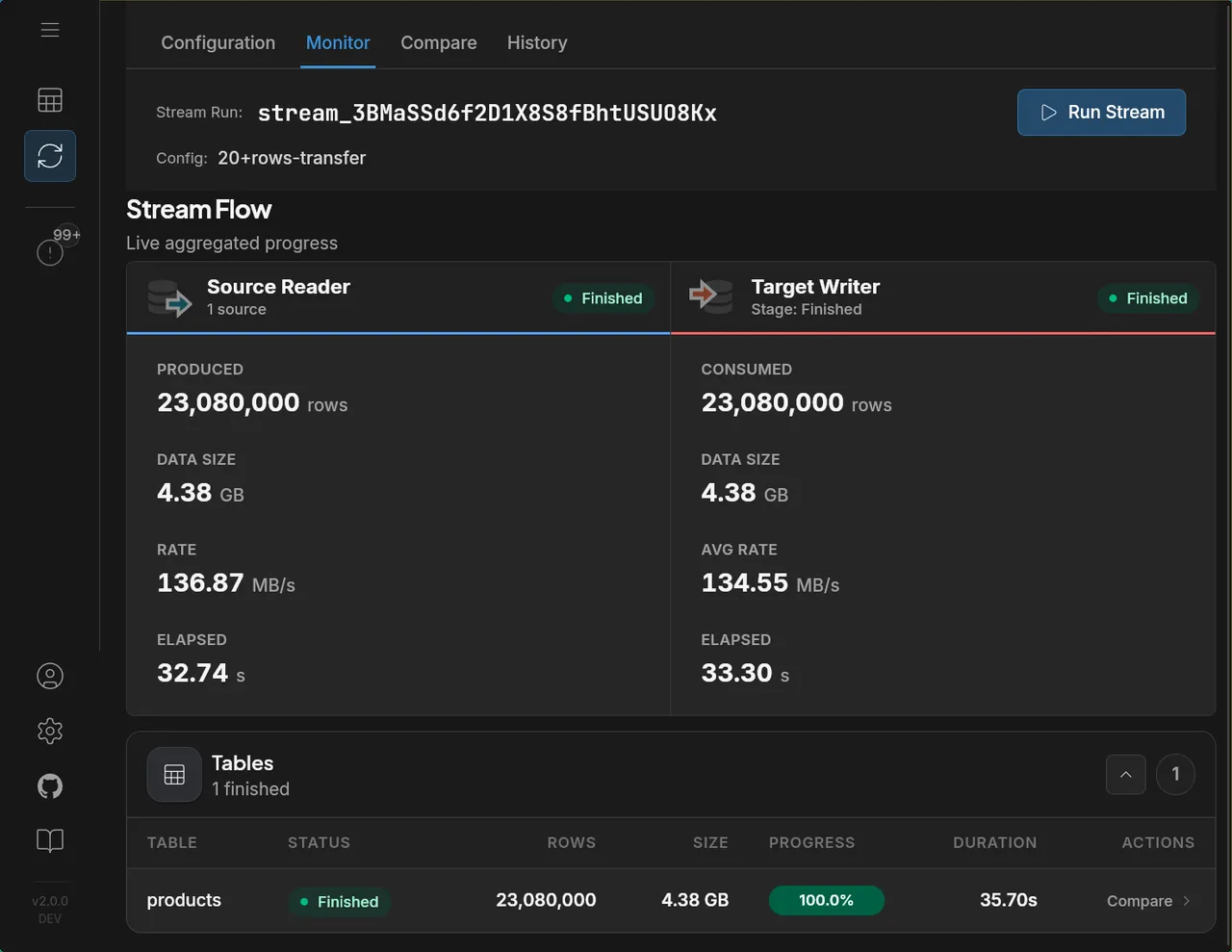
Key Features:
- Convert Mode vs Change Data Capture Mode: DBConvert Streams offers two distinct operational modes
- Convert Mode: Designed for one-time bulk data migration and format conversion
- Change Data Capture Mode: Provides real-time continuous replication with low latency
- Real-Time Replication: Millisecond-latency change capture from mysql source table to target systems. DBConvert Streams processes incoming data from MySQL, ensuring that all target systems are kept up to date as new change events occur.
- Monitoring Dashboard: Real-time metrics and alerting for pipeline health
Comparing Operational Modes
When implementing MySQL CDC with DBConvert Streams, understanding the difference between operational modes is crucial:
Convert Mode is optimized for:
- Initial data migration projects
- One-time data warehouse loading
Change Data Capture Mode excels at:
- Continuous real-time replication
- Event-driven architecture support
- Keeping downstream systems synchronized
- Building real time cdc pipeline for analytics
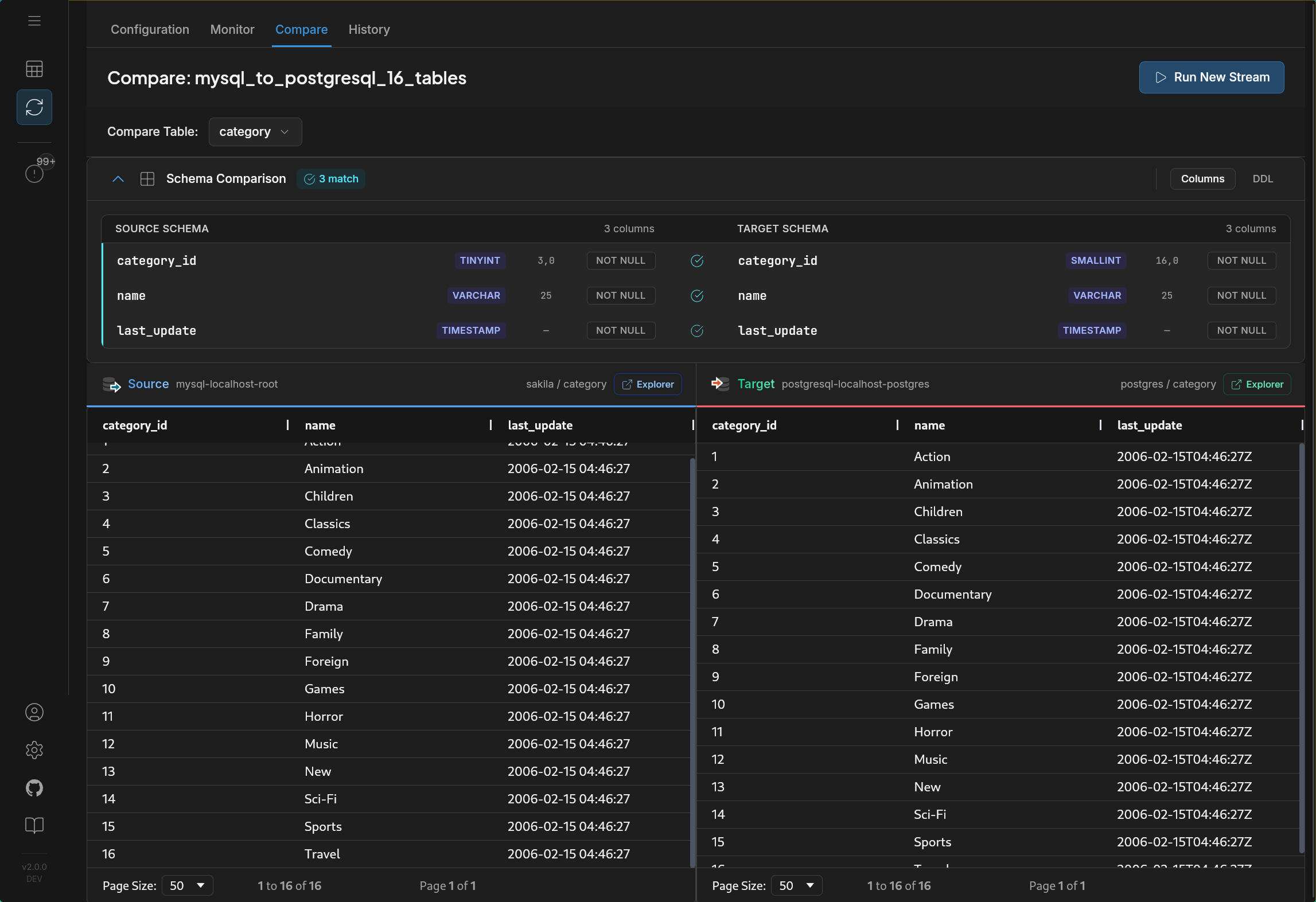
Both modes include automatic schema conversion between different database systems (e.g., MySQL to PostgreSQL).
Choose Change Data Capture Mode when you need ongoing synchronization and real-time data availability across your data architecture.
Other MySQL CDC Solutions
If you look at existing CDC solutions, most fall into a few categories:
- Debezium - Kafka-based CDC, flexible but requires infrastructure
- Airbyte - connector-heavy platform, mostly batch or micro-batch
- Fivetran - fully managed SaaS, usage-based pricing
- AWS DMS - migration-focused, limited outside AWS
Each of them solves part of the problem, but often requires combining multiple tools.
Full comparison:
https://streams.dbconvert.com/vs
Comparing more than these? Our fact-checked roundup covers deployment, pricing basis, and ops burden across eight options: The 8 Best Change Data Capture (CDC) Tools in 2026.
Building End-to-End CDC Pipelines
Real-Time MySQL to PostgreSQL Replication setup
How it actually looks in practice
In real setups, CDC is not configured via JSON.
The typical flow is:
- create a source connection
- create a target
- start a CDC stream
The system handles binlog parsing, ordering, and delivery.
Step-by-step guide:
https://streams.dbconvert.com/get-started/first-stream/
Start and monitor the stream
After setup, starting CDC is just one action.
From there, the system continuously reads binlog events and applies them to the target.
What matters in practice:
- replication lag
- throughput
- failure handling
Most problems don’t come from setup - they show up while the stream is running.
Common challenges
Initial data load
CDC only captures changes going forward.
The hardest part of CDC is usually not streaming changes — it’s the initial load.
For large tables, the typical approach is:
- run a one-time bulk load first
- then switch to CDC for ongoing changes
Trying to start CDC on a large dataset without this step often leads to lag and inconsistencies.
Testing and rollout
Before running CDC on the full dataset, it’s common to:
- start with a few tables
- run the stream for a limited time
- verify consistency
This helps catch issues early without affecting production systems.
Throughput and latency
Throughput depends heavily on network conditions.
In high-latency environments, batching becomes important to avoid excessive round trips.
Most systems expose this as a configurable parameter, but defaults are usually enough to get started.
Most CDC issues don’t come from setup — they show up under load.
Monitoring the stream
Two positions need watching: where MySQL is writing and where your consumer has applied. SHOW BINARY LOG STATUS (MySQL 8.0.22+; earlier versions use SHOW MASTER STATUS) gives the current write position; the gap between it and the position your CDC tool reports as applied is the replication lag. DBConvert Streams surfaces this in the Monitor tab — per-table progress, throughput, and the checkpointed position the stream would resume from.
FAQ
Can MySQL CDC capture schema changes?
Yes. Binlog-based CDC captures DDL events if configured correctly.
What MySQL version is required?
MySQL 5.7+ works, but 8.0+ is recommended for production.
Does CDC impact performance?
Binlog-based CDC has minimal impact. Trigger-based approaches can slow down writes.
Does CDC work with cloud databases?
Yes. AWS RDS, Google Cloud SQL, and Azure Database all support it.
How do you handle schema changes?
Schema changes are one of the trickier parts. Most setups require coordination and sometimes stream reconfiguration.
Do I need Kafka for MySQL CDC?
No. Some tools require it, but binlog-based CDC can work without additional infrastructure.
How long are binlog files kept, and why does it matter for CDC?A CDC consumer can only resume from binlog files that still exist. Self-managed MySQL 8.0 keeps them for 30 days by default (binlog_expire_logs_seconds); Amazon RDS and Aurora manage purging themselves and can drop binlogs within hours — check mysql.rds_show_configuration and set 'binlog retention hours' before relying on stop-and-resume.
What happens to CDC after a failover — file+position vs GTID?Binlog file names and positions are server-local: after promoting a replica they no longer point at the same events, so a consumer pinned to file+position has to re-sync. With gtid_mode=ON every transaction carries a globally unique id that survives topology changes, so a GTID-aware consumer can resume on the new primary. If failover matters, run GTID mode.
Summary
MySQL CDC itself is straightforward:
read binlog -> apply changes
The complexity comes from everything around it:
- initial data load
- consistency during replication
- monitoring and recovery
Different tools mostly differ in how much of that they handle for you.
That’s where most CDC implementations either stay simple or become a mess.
The fastest way to understand CDC is to run it.
Create your first stream:
https://streams.dbconvert.com/get-started/first-stream/
Runs as a desktop app (Windows, macOS, Linux) or via Docker.
MySQL -> PostgreSQL, S3, or files, real-time sync, no Kafka.