Supabase PostgreSQL Guide
Use this page when your PostgreSQL source or target is hosted in Supabase.
This guide focuses on the Supabase-specific parts of the setup:
- choosing the correct Supabase connection method
- importing the PostgreSQL URI into DBConvert Streams
- SSL/TLS expectations
- CDC preparation when Supabase is used as a PostgreSQL CDC source
For the core PostgreSQL workflow, use:
Base setup
- Open the Supabase Dashboard.
- Select the project that DBConvert Streams should use.
- Click Connect in the Supabase project header.
- Select Direct connection if the DBConvert Streams deployment can use IPv6. Select Session pooler if the deployment needs IPv4 access.
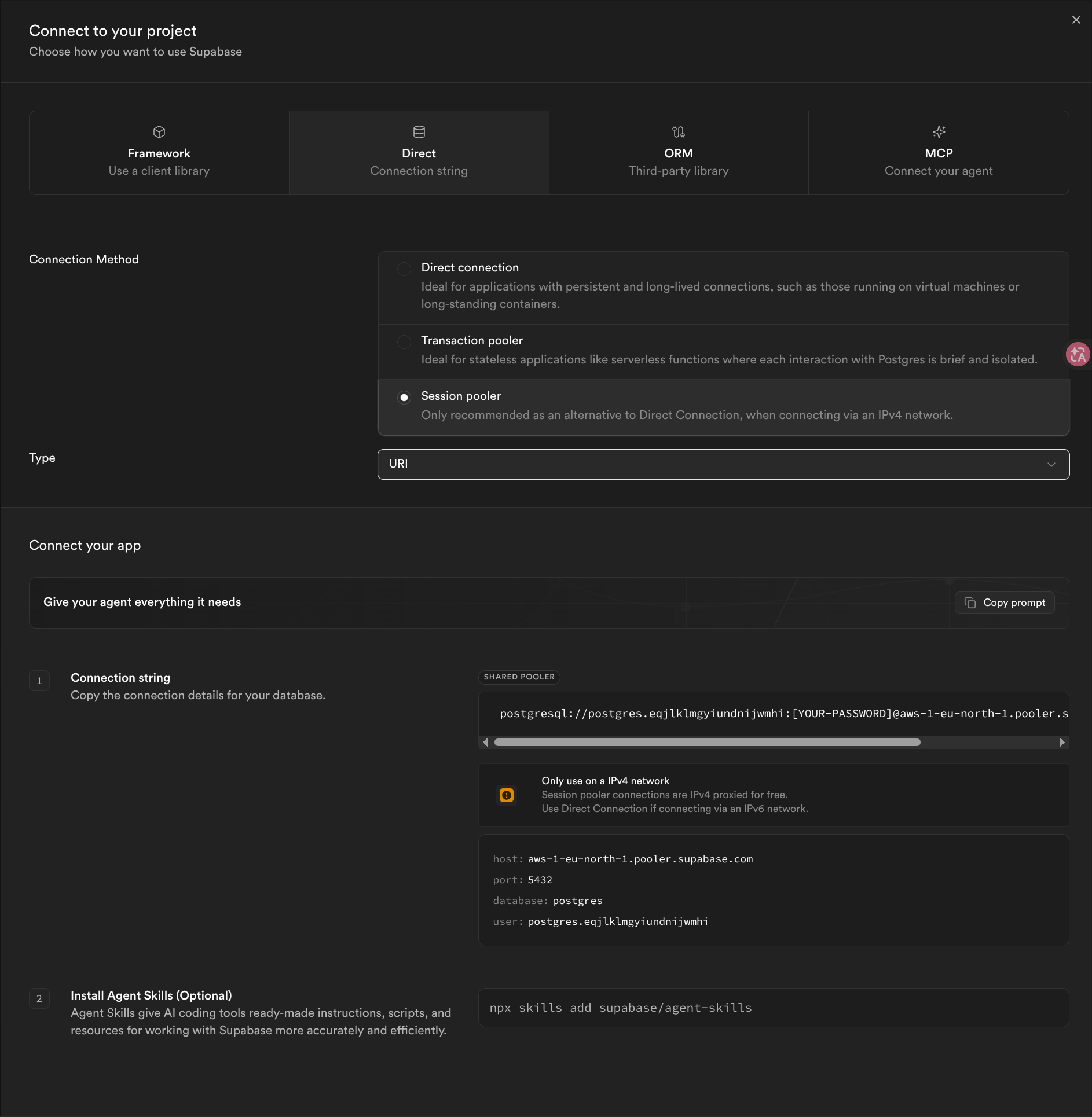
- Copy the connection URI and replace
[YOUR-PASSWORD]with the database password.
Typical direct connection pattern:
postgresql://postgres:[YOUR-PASSWORD]@db.<project-ref>.supabase.co:5432/postgres
Typical session pooler pattern:
postgresql://postgres.<project-ref>:[YOUR-PASSWORD]@<region>.pooler.supabase.com:5432/postgres
Connection method
Use the connection method that matches the network path from your DBConvert Streams deployment:
| Supabase method | Use when | Notes |
|---|---|---|
| Direct connection | The deployment supports IPv6 or your Supabase project has IPv4 access enabled | The only method that carries CDC |
| Session pooler | The deployment needs IPv4 access without a direct IPv4 endpoint | Explorer and Load only — CDC fails on it |
| Transaction pooler | Short-lived application traffic | Statements are not kept in one session — not for CDC |
Supabase direct database hostnames are IPv6-oriented by default. If your host or container network cannot reach IPv6 addresses, use the Session pooler URI from the Supabase Connect panel — unless you are setting up CDC, in which case see below.
Logical replication runs over the direct connection only. Supabase states it plainly: "Always use the direct connection string for logical replication. Connections through a pooler, such as Supavisor, will not work."
The direct host resolves to IPv6 only. Supabase proxies the session pooler over IPv4 at no charge, but the direct endpoint needs their paid IPv4 add-on. So on an IPv4-only network, CDC from Supabase requires that add-on — there is no free path. Explorer and Load are unaffected: the session pooler carries them on the free plan.
Add the connection in DBConvert Streams
- Open Data Explorer.
- Click New connection.
- Select PostgreSQL.
- Paste the Supabase URI into Connection String.
- Confirm that DBConvert Streams fills in the host, port, username, password, and database fields.
- Set SSL/TLS to
requireunless your environment has a stricter certificate verification policy. - Click Test Connection.
- Save the connection after the test succeeds.
SSL requirements
Treat SSL/TLS as required for Supabase connections.
Common DBConvert Streams settings:
- SSL mode:
require - Host: copied from the Supabase Direct connection or Session pooler URI
- Port:
5432 - Database: usually
postgres, unless you created a separate database - Username:
postgresfor Direct connection, orpostgres.<project-ref>for Session pooler
Use SSL Configuration if your deployment requires certificate verification with a CA file.
CDC source preparation
If Supabase is only a Load source, Explorer connection, or target, the base PostgreSQL connection setup is enough.
If Supabase is the CDC source, the connection must use the Direct connection URI. A pooler endpoint does not carry the PostgreSQL replication protocol, so the stream fails before it reads anything — see below for what that looks like.
Before creating the CDC stream:
- Confirm the Supabase plan and project settings allow the logical replication resources you need.
- Use a database role with the privileges required by PostgreSQL CDC Source Configuration.
- Verify the replication settings from SQL:
SELECT name, setting
FROM pg_settings
WHERE name IN (
  'wal_level',
  'max_replication_slots',
  'max_wal_senders'
);
- Confirm
wal_levelislogical. - Complete the publication, slot, and stream setup in PostgreSQL CDC Source Configuration.
What a pooler endpoint looks like when it fails
Starting a CDC stream against a session pooler URI fails during preparation, with the replication protocol commands reported as SQL syntax errors:
failed to identify system:         ERROR: syntax error at or near "IDENTIFY_SYSTEM"         (SQLSTATE 42601)
failed to create replication slot: ERROR: syntax error at or near "CREATE_REPLICATION_SLOT" (SQLSTATE 42601)
Nothing is wrong with the commands. IDENTIFY_SYSTEM and CREATE_REPLICATION_SLOT belong to the PostgreSQL replication protocol and are only valid on a connection opened in replication mode. The pooler does not provide one, so it parses them as ordinary SQL and PostgreSQL answers 42601.
The database side can look perfectly healthy while this happens — wal_level is logical, slots are free, and ordinary queries work. Switch the connection to the Direct connection URI.
Note that the publication is created before this point, because CREATE PUBLICATION is ordinary DDL and passes through the pooler. A failed start can therefore leave the stream's publication (dbconvert_<stream config id>) behind on the source. It holds no WAL and is reused on the next start. Deleting the stream drops it.
Validation checklist
- Test the Supabase connection from the Data Explorer sidebar or from the connection editor.
- Open it in Data Explorer and confirm schemas and tables are visible.
- If the connection fails from an IPv4-only environment, switch from Direct connection to the Supabase Session pooler URI.
- If using CDC, run
SHOW wal_leveland confirm it returnslogical. - If using CDC, confirm the connection uses the Direct connection URI. Neither pooler carries replication; a stream on a pooler endpoint fails with
syntax error at or near "IDENTIFY_SYSTEM".