Change Data Capture (CDC) Mode
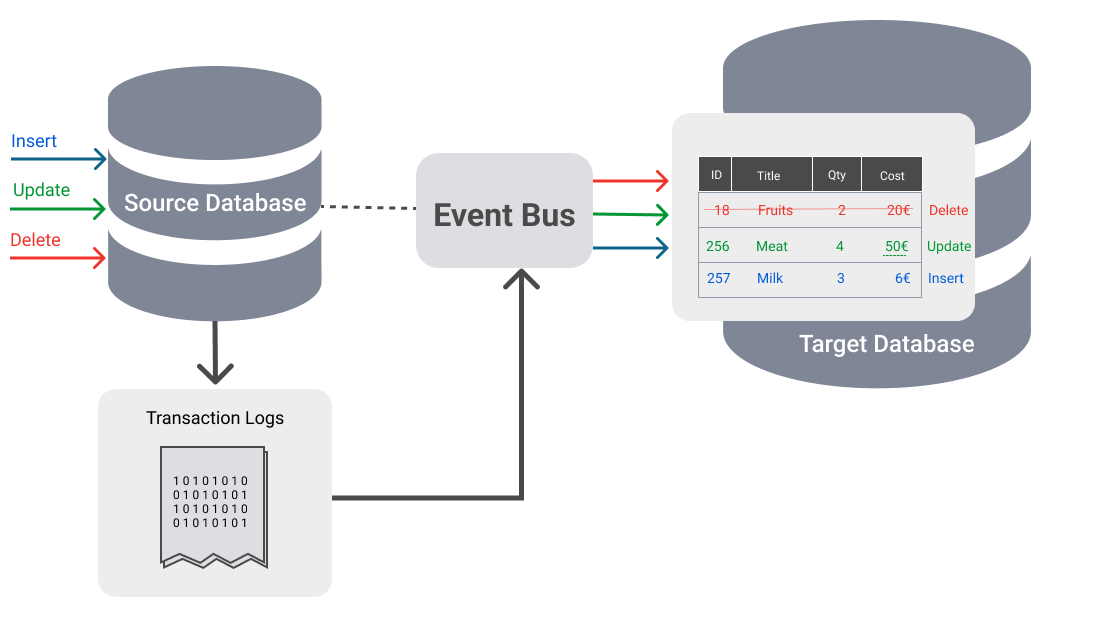
CDC mode is the continuous-replication mode in DBConvert Streams. It reads row-level changes from supported transactional database logs and propagates them to a downstream target.
When to use CDC
Use CDC when you need ongoing synchronization of INSERT, UPDATE, and DELETE events after an initial load. For one-time migrations or bounded transfers, use Load mode instead.
If the source already contains rows, CDC can optionally run an initial snapshot before it starts reading ongoing changes.
For a side-by-side comparison, see Stream Types: CDC vs Load.
 2:25Watch on YouTubeCDC without Kafka: MySQL to PostgreSQL live replication
How CDC works
CDC reads from the source engine's transactional log rather than querying tables directly:
| Source engine | Log mechanism | Configuration guide |
|---|---|---|
| MySQL-compatible | Binary log (binlog) | MySQL CDC Source Configuration |
| PostgreSQL-compatible | WAL / logical replication | PostgreSQL CDC Source Configuration |
DBConvert Streams converts captured log entries into mutation events and applies them to the target in order.
For a longer conceptual treatment of CDC — methods compared, use cases, and best practices — see Understanding Change Data Capture.
What CDC captures and what it does not
Captured:
INSERT,UPDATE,DELETErow-level events from the source log- committed transaction changes; rolled back transactions are not applied to the target
Not captured:
- DDL changes made on the source after the stream starts (e.g.,
ALTER TABLE,DROP TABLE). However, tables, structures, and indexes are created on the target if they are missing when the stream starts — controlled by the structure options. - Changes on tables not included in the stream scope
- Events that occurred before the stream started or before log retention begins
Prerequisites
Before creating a CDC stream:
- The source connection must already work in DBConvert Streams — right-click it in the Data Explorer sidebar and select Test connection, or use the Test Connection button in the connection editor.
- The source engine must expose its transactional log — see the configuration guide for your engine above.
- The CDC user must have replication-related privileges on the source.
- The source–target combination must be within the CDC support boundary. Confirm in the Capability Matrix.
Typical rollout options
Use the pattern that matches your support boundary and rollout requirements:
- Preferred when supported: run one CDC stream with Initial Load + CDC enabled.
- Alternative: run Load first for initial data movement, then start CDC on the same source for ongoing changes.
If you choose Initial Load + CDC, the common sequence is:
- Create a CDC stream on the source table.
- Enable Initial Load + CDC.
- Use
upserttarget write mode. - Start the stream and open the Monitor tab.
- Confirm the bootstrap phase completes and CDC Continuity shows a healthy handoff into CDC apply.
Use Load first when the initial load is a separate migration task, the target is not empty, or the source/target shape is outside Initial Load + CDC support.
For MySQL sources, eligible bootstrap tables can use resumable chunked snapshot copy automatically. For PostgreSQL sources, bootstrap stays on the plain path before CDC handoff. See Resumable Load for the routing rules.
Reliability and resume
CDC checkpoints advance after target writes succeed. If you stop a CDC stream and start the same config later, DBConvert Streams resumes from the saved source position as long as the source database still retains the required binlog/WAL range.
For details, see CDC Reliability and Resume.
Related docs
- MySQL CDC Source Configuration
- PostgreSQL CDC Source Configuration
- Initial Load + CDC
- Resumable Load
- CDC Reliability and Resume
- Load Mode
- Stream Types: CDC vs Load