MySQL Target Configuration
Use this page when MySQL is the target for a DBConvert Streams workflow.
MySQL targets receive data from both Load and CDC streams. The source can be MySQL, PostgreSQL, local files, or S3-compatible storage.
Target privileges
The target user needs write access to the target database. The exact privileges depend on the stream configuration:
| Privilege | When needed |
|---|---|
INSERT | Always — all streams write rows |
CREATE | When structure options allow table/index creation |
ALTER | When structure options create indexes or constraints on existing tables |
DROP | When schemaPolicy is drop_and_recreate |
TRUNCATE | When writeMode is truncate_and_load |
Example grant for a target user that can create and write:
GRANT INSERT, CREATE, ALTER, DROP ON target_db.* TO 'target_user'@'%';
FLUSH PRIVILEGES;
For connection and network setup, see MySQL Server Configuration. To verify visible tables and schemas, open the connection in Data Explorer.
Target behavior
Two settings control what the stream does with existing target tables and data:
| Setting | What it controls | Default (Load) | Default (CDC) |
|---|---|---|---|
schemaPolicy | What to do if target tables already exist | fail_if_exists | validate_existing |
writeMode | What to do if target tables contain rows | fail_if_not_empty | upsert |
CDC mode supports upsert (default, recommended) and append. Use append for insert-only workloads where you want maximum write throughput. See Target Schema and Data Policies for all values and decision guidance.
Structure creation
By default, the stream creates missing tables, indexes, foreign keys, and check constraints on the target. Disable any of these with structure options.
A foreign key that points at a table outside the stream is skipped with a warning. MySQL refuses such a key, and the stream copies the rest.
When the source is PostgreSQL, data types are converted automatically. See the type mapping tables for what each type becomes.
Performance tuning
For high-volume streams (millions of rows), MySQL server settings have a significant impact on write throughput. The defaults prioritize durability over speed — every transaction commit triggers an fsync to disk. Relaxing these settings can improve write performance by 2–5x.
Recommended settings for bulk loads and CDC
SET GLOBAL innodb_flush_log_at_trx_commit = 2;
SET GLOBAL sync_binlog = 0;
SET GLOBAL innodb_io_capacity = 2000;
SET GLOBAL innodb_io_capacity_max = 4000;
| Setting | Default | Recommended | Effect |
|---|---|---|---|
innodb_flush_log_at_trx_commit | 1 (fsync every commit) | 2 (fsync once per second) | Largest single improvement. Reduces disk I/O per transaction. |
sync_binlog | 1 (fsync every binlog event) | 0 (OS-managed flush) | Reduces binlog write overhead. |
innodb_io_capacity | 200 | 2000 | Allows InnoDB to flush dirty pages faster. |
innodb_io_capacity_max | 2000 | 4000 | Upper bound for background flushing. |
Trade-off: With innodb_flush_log_at_trx_commit = 2, up to one second of committed transactions can be lost if the MySQL process crashes (not the OS — only the mysqld process). For CDC workflows this is safe because the source replication slot retains unacknowledged data, so the stream can be restarted without data loss.
To make these settings persistent across MySQL restarts, add them to your MySQL configuration file (my.cnf or my.ini):
[mysqld]
innodb_flush_log_at_trx_commit = 2
sync_binlog = 0
innodb_io_capacity = 2000
innodb_io_capacity_max = 4000
Buffer pool sizing
For large transfers, increase the InnoDB buffer pool to at least 50% of available RAM:
SET GLOBAL innodb_buffer_pool_size = 1073741824; -- 1 GB
Cloud-hosted MySQL
Managed MySQL services (AWS RDS, Google Cloud SQL, Azure Database for MySQL) may not expose all InnoDB settings. Check your provider's documentation for available parameters. Most providers default to innodb_flush_log_at_trx_commit = 1, which can be changed through parameter groups (RDS) or database flags (Cloud SQL).
Benchmark: 10 million rows, PostgreSQL CDC → MySQL
A real-world CDC stream migrating 10,000,000 rows (1.14 GB) from PostgreSQL to MySQL with 2× target writers and the tuning settings above:
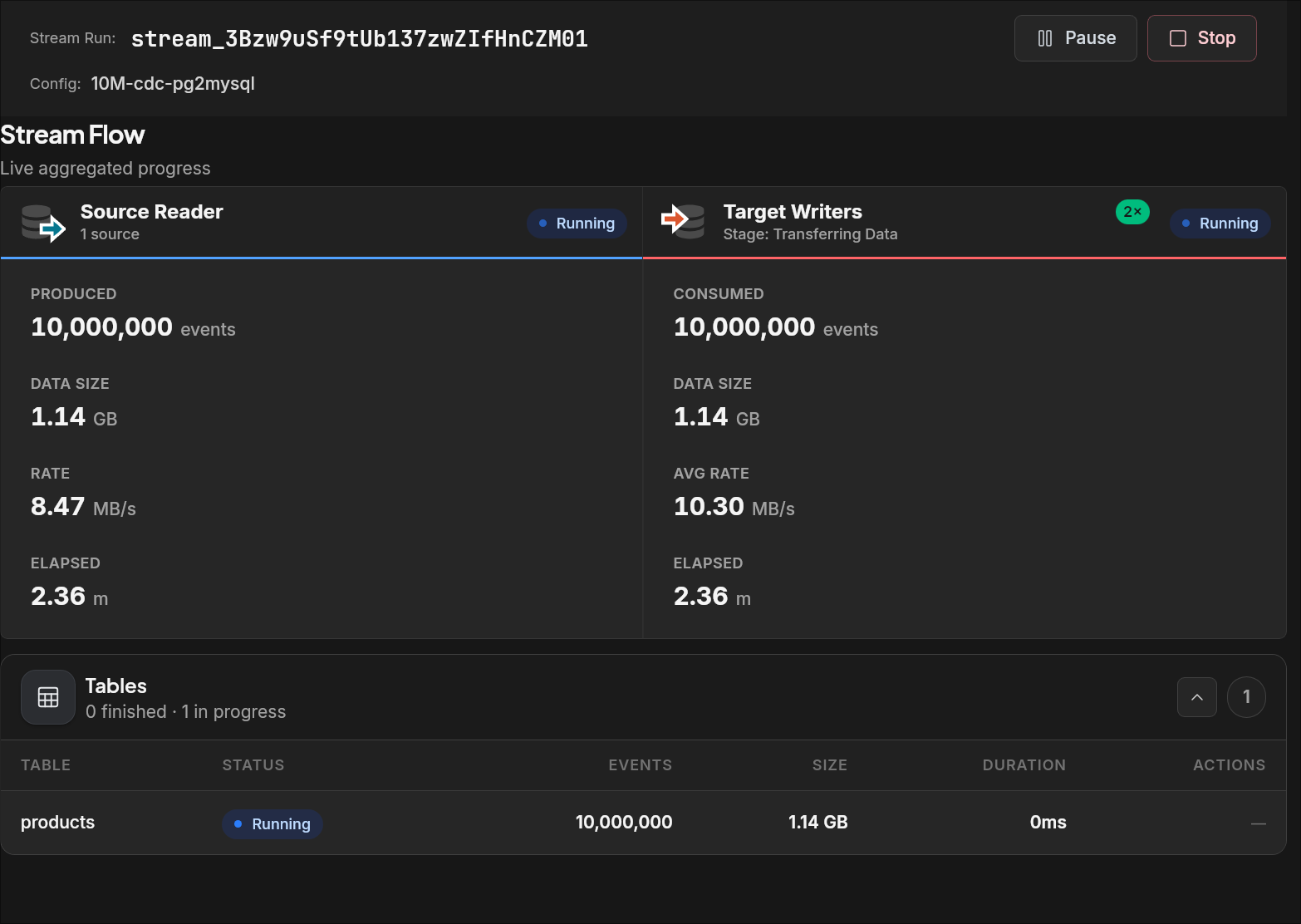
| Metric | Value |
|---|---|
| Rows transferred | 10,000,000 |
| Data size | 1.14 GB |
| Source read rate | 8.47 MB/s |
| Target write rate (avg) | 10.30 MB/s |
| Elapsed time | 2.36 min |
| Target writers | 2× |
The stream used the recommended innodb_flush_log_at_trx_commit = 2 and sync_binlog = 0 settings on the MySQL target. With default MySQL settings, the same transfer takes significantly longer due to per-transaction disk flushes.
Validation checklist
- Test the target connection from the Data Explorer sidebar (right-click → Test connection) or from the connection editor.
- Open the target database in Data Explorer and confirm the expected database is reachable.
- Verify the target user has the required privileges for your chosen schema policy and write mode.
- Run a small validation stream (one or two tables) before scaling up.