DigitalOcean Managed Database Guide
Use this page when your source or target is hosted in a DigitalOcean managed database.
This guide focuses on the provider-specific parts of the setup:
- trusted-source network allowlisting
- managed MySQL and managed PostgreSQL connection details
- DigitalOcean-specific constraints around CDC-related settings
For the core workflow split, use:
- MySQL Server Configuration
- PostgreSQL Server Configuration
- MySQL CDC Source Configuration
- PostgreSQL CDC Source Configuration
Base setup
- Open the DigitalOcean console and select the managed database cluster.
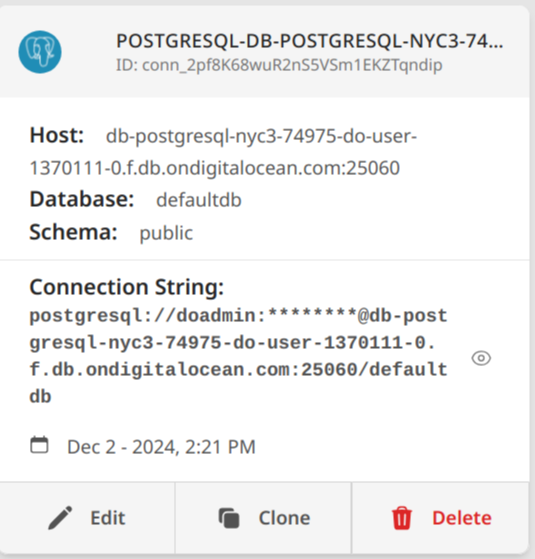
- Note the host, port, database name, username, and password.
- Add the DBConvert Streams deployment IP address or range to Trusted Sources.
- Confirm the workflow: Load only, or MySQL/PostgreSQL CDC source.
Network access
DigitalOcean managed databases rely on trusted-source allowlisting. Before you create a stream:
- add the DBConvert Streams deployment IP or range
- wait for the rule to propagate
- test the connection from the Data Explorer sidebar (right-click → Test connection) or from the connection editor
Managed MySQL notes
DigitalOcean managed MySQL typically exposes binlog behavior as a managed service capability rather than a fully user-tuned MySQL instance.
Use this page conservatively:
- verify binlog-related settings if the provider exposes them
- do not assume every low-level MySQL replication setting is customer-configurable
- follow MySQL CDC Source Configuration for the DBConvert Streams-side CDC requirements; for how binlog CDC works in general, see MySQL Change Data Capture
DigitalOcean managed MySQL may restrict privileges such as `SUPER` or `REPLICATION SLAVE`. Verify available grants with `SHOW GRANTS` before configuring CDC.
Helpful checks:
SHOW VARIABLES LIKE 'binlog_format';
SHOW VARIABLES LIKE 'binlog_row_image';
SHOW BINARY LOG STATUS;
On MySQL versions before 8.0.22, use `SHOW MASTER STATUS` instead.
Managed PostgreSQL notes
DigitalOcean managed PostgreSQL may expose logical-replication capability, but managed limits still apply.
Use this page conservatively:
- verify logical replication prerequisites if the provider exposes them
- do not assume unrestricted access to every PostgreSQL replication setting
- follow PostgreSQL CDC Source Configuration for the DBConvert Streams-side CDC requirements; for how logical-replication CDC works in general, see PostgreSQL Change Data Capture
Helpful checks:
SHOW wal_level;

SELECT name, setting
FROM pg_settings
WHERE name IN (
  'wal_level',
  'max_replication_slots',
  'max_wal_senders'
);
Validation checklist
- Test the managed database connection from the Data Explorer sidebar (right-click → Test connection) or from the connection editor. If it fails, confirm the deployment IP is listed in Trusted Sources.
- Open it in Data Explorer to confirm visible objects.
- For MySQL CDC, run
SHOW GRANTSand verify the user has replication-related privileges. IfSUPERorREPLICATION SLAVEis missing, contact DigitalOcean support or use Load mode instead.RELOADis restricted on many managed instances and is needed only for the initial snapshot — without it, run the stream in CDC-only mode. - For PostgreSQL CDC, run
SHOW wal_leveland confirm it returnslogical. If DigitalOcean does not expose this setting, CDC may not be available on this managed tier.