Databricks Lakebase Guide
Use this page when a PostgreSQL connection in DBConvert Streams points at Databricks Lakebase, the managed Postgres that runs inside a Databricks workspace.
Lakebase speaks the PostgreSQL wire protocol, so the standard connection form applies.
What works
| Direction | Supported |
|---|---|
| Lakebase as target, Load | Yes |
| Lakebase as target, CDC | Yes |
| Lakebase as source, Load | Yes |
| Lakebase as source, CDC | No - see Lakebase as a CDC source |
Enable password connections
Lakebase accepts Databricks OAuth identities by default. Those tokens expire after one hour, so they cannot drive a stored connection or a long-running stream. DBConvert Streams needs a native Postgres role with a password.
- Open the Lakebase project in the Databricks workspace and click Settings in the left sidebar, under PROJECT.
- Scroll to Database connections and tick Password (Native postgres roles).
- Click Save, then Allow in the confirmation dialog.
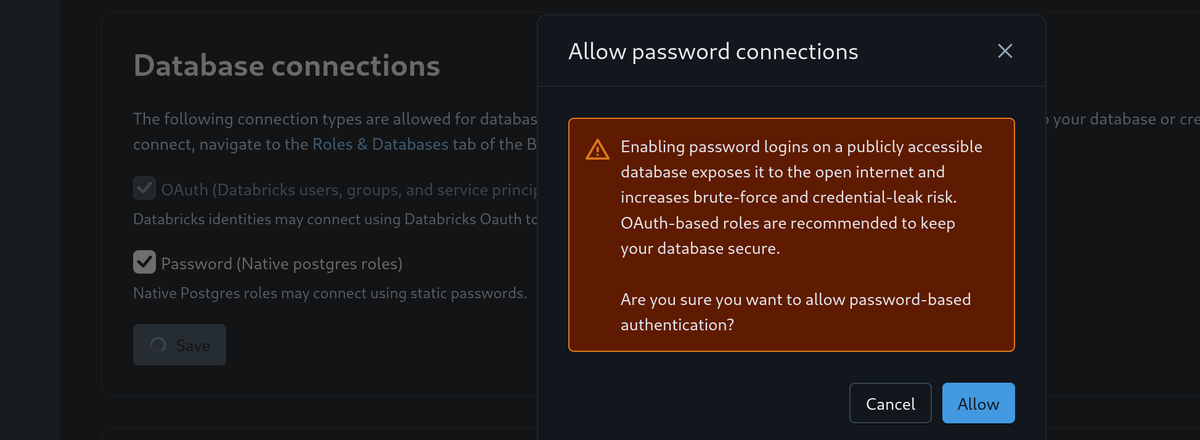
The warning in that dialog is worth reading rather than clicking past: password logins on a publicly reachable database do widen the attack surface, and Databricks recommends OAuth instead. If your security policy forbids enabling this, no external tool can connect to that Lakebase project at all.
Create the role
Open your branch and switch to the Roles & Databases tab.
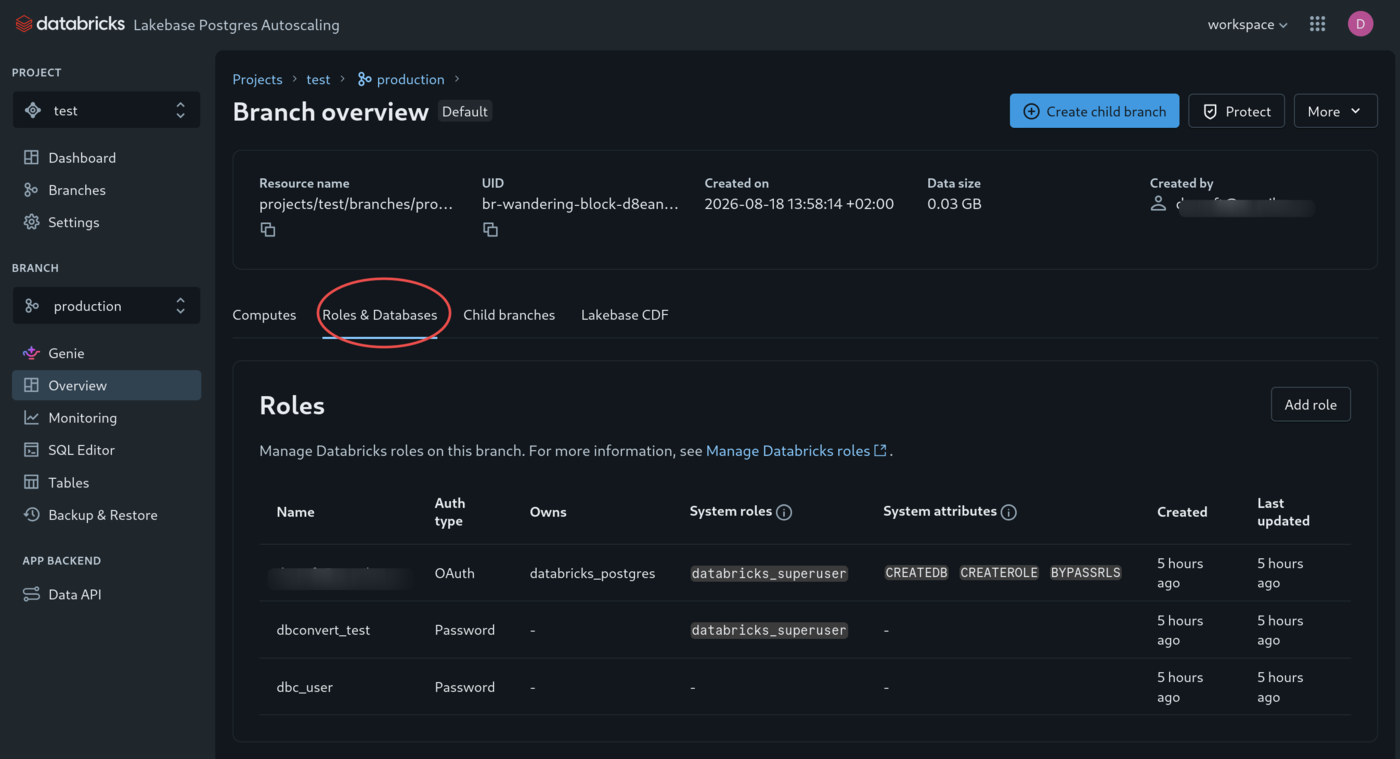
Click Add role, then:
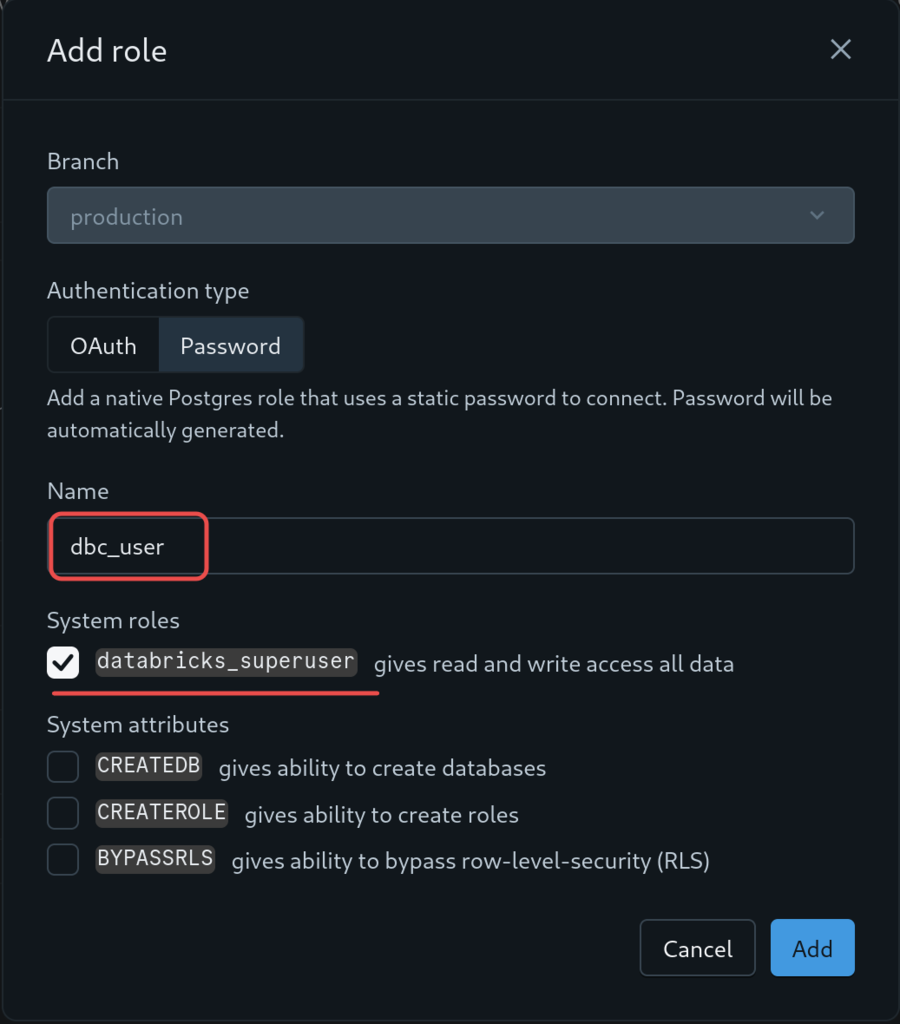
- Set Authentication type to Password. Databricks generates the password for you.
- Enter a name, for example
dbc_user. Do not leave a leading space - the name is taken as typed, and a role named" dbc_user"is not the one you will type into a connection string. - Tick
databricks_superuserso the role can read and write data and create tables. Leave System attributes alone:CREATEDB,CREATEROLEandBYPASSRLSare Postgres role attributes, not access to your data, and a stream needs none of them unless it should create a database of its own. - Click Add, then copy the generated password.
Creating the role in SQL instead
A role created with CREATE ROLE starts with no privileges of its own, so grant them in the
same session. PostgreSQL 15 and later no longer give CREATE on public to every role, and
without it a stream that creates tables stops before it writes anything.
CREATE ROLE dbc_user LOGIN PASSWORD 'a-long-random-password';
GRANT CREATE, USAGE ON SCHEMA public TO dbc_user;
For a role that only reads:
CREATE ROLE dbc_reader LOGIN PASSWORD 'a-long-random-password';
GRANT USAGE ON SCHEMA public TO dbc_reader;
GRANT SELECT ON ALL TABLES IN SCHEMA public TO dbc_reader;
This applies to a role without databricks_superuser. Such a role cannot read a table
created by your Databricks identity until you grant it, and the symptom is confusing:
information_schema hides columns the connected user has no rights on, so the table appears
in Data Explorer with its indexes but no columns at all. Grant access to it, or transfer
ownership with ALTER TABLE ... OWNER TO dbc_user.
Connect
Open Connect on the project dashboard and set Role to the password role you just created. The dialog defaults to your Databricks identity, which produces an OAuth connection string - one that expects a token valid for an hour where the password goes. Feeding that to DBConvert Streams fails with:
ERROR: Provided authentication token is not a valid JWT encoding (SQLSTATE 28P01)
With the password role selected, leave Connection pooling off and copy the connection string. It carries the role's password, so treat it as a secret.
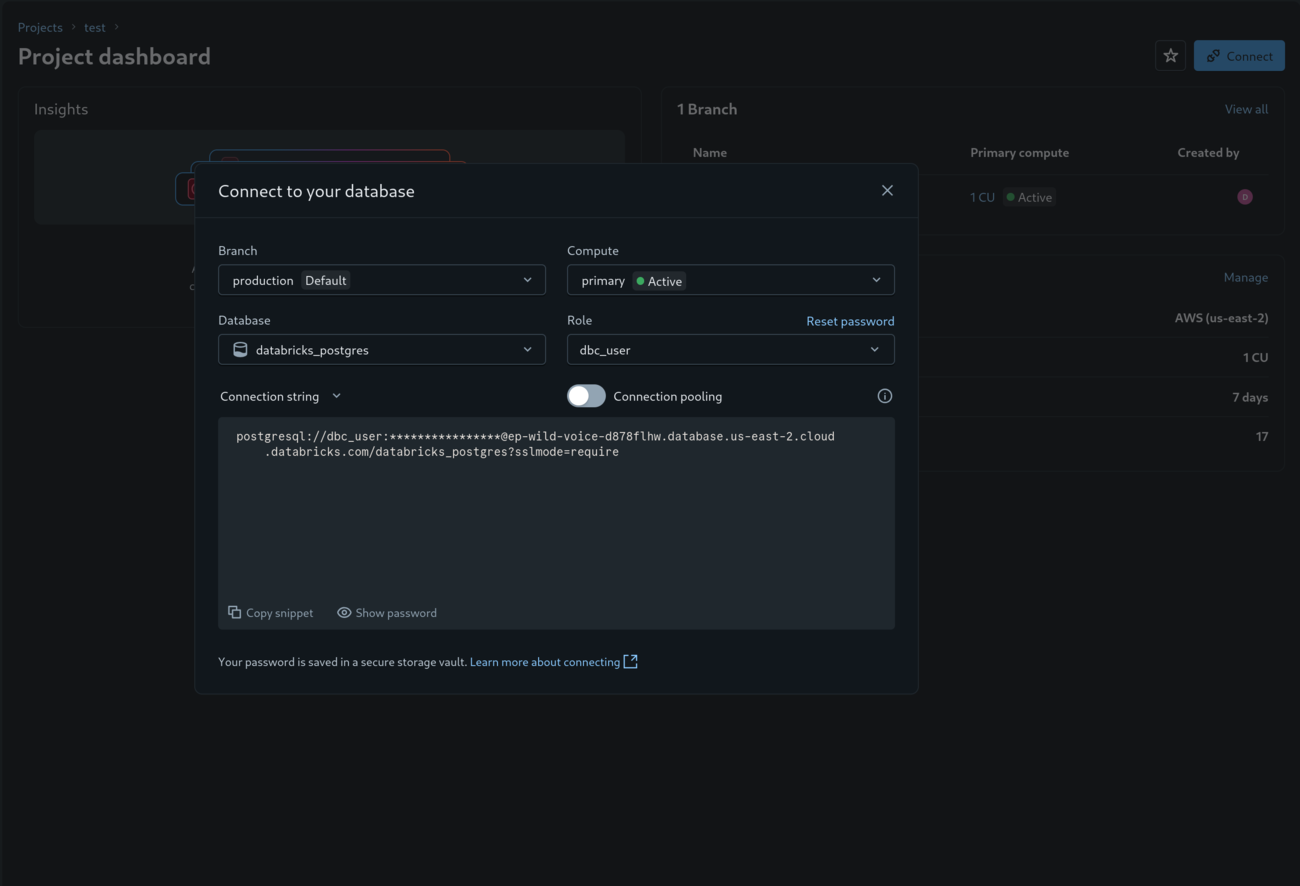
postgresql://dbc_user:[email protected]:5432/databricks_postgres?sslmode=require
In the DBConvert Streams connection form, paste it into Quick fill, or enter the parts:
| Field | Value |
|---|---|
| Host | ep-<name>-<id>.database.<region>.cloud.databricks.com |
| Port | 5432 |
| Database | databricks_postgres (the default database of a new project) |
| SSL Mode | Require |
Lakebase refuses unencrypted connections, so SSL is mandatory and no certificate files are needed. A recognized connection shows a Databricks Lakebase badge in Data Explorer.
Lakebase as a target
DBConvert Streams writes to Lakebase with ordinary SQL, so nothing on the target side is specific to it. Follow PostgreSQL Server Configuration.
Lakebase as a CDC source
A Lakebase database cannot be a CDC source, and no configuration changes that.
Everything the server reports suggests otherwise: wal_level is logical, replication
slots are free, and a role created through the Databricks UI carries rolreplication.
Slots can even be created. What fails is the publication that logical decoding needs:
| Operation | Result |
|---|---|
SELECT current_setting('wal_level') | logical |
pg_create_logical_replication_slot(...) | succeeds |
| Replication connection | opens |
CREATE_REPLICATION_SLOT ... EXPORT_SNAPSHOT | succeeds |
CREATE PUBLICATION ... | fails |
The refusal comes back as:
ERROR: [Databricks Auth] Feature not supported by Databricks. (SQLSTATE 0A000)
0A000 is feature_not_supported, not a privilege error, and the [Databricks Auth]
prefix places it in the Databricks proxy rather than in Postgres. There is no GRANT that
lifts it. Databricks documents the restriction as
logical replication being unavailable
and offers Lakehouse Sync for moving Lakebase tables into Delta.
A stream with Lakebase as its source therefore stops at the CDC handoff. Use Load mode to copy a snapshot out of Lakebase; the data transfers normally.
Verification checklist
- Test the connection from the connection editor. A TLS failure means SSL Mode is not
Require. - Open the database in Data Explorer and confirm the schemas and tables you expect are visible. Missing columns on a visible table means the role lacks privileges on it, not that the table is empty.
- For a target stream, confirm the role can create tables. DBConvert Streams checks this
before the first write and reports
PREFLIGHT_TARGET_NOT_WRITABLEwithpermission denied for schema publicwhen it cannot - either because the role was created in SQL without theGRANT, or becausedatabricks_superuserwas left unticked.
Related docs
- PostgreSQL Server Configuration
- Neon PostgreSQL Guide - Lakebase runs on the same engine
- PostgreSQL CDC Source Configuration